
What Should a System Administrator Learn First: AWS, Linux or DevOps?
If you run servers for a living, the question is rarely whether to learn something new. It is what to learn first. AWS vs Linux vs DevOps for system administrators comes down to one test: which of the three has the biggest hole in what you can do today? Fix that one first.
This guide gives the short answer, a self-check that takes about twenty minutes, an order for three common starting points, a 12-week plan that fits around a job and pay data from a named source. It makes no promise of a job, title or raise.
Table of Contents
▼The Short Answer
For most system administrators the order is Linux depth, then AWS core services, then DevOps practices. Each one builds on the one before it. Two things change that. If your Linux is already strong, start with AWS. If you mostly run Windows servers, spend the first few weeks on Linux anyway, because a lot of the tutorials, container images and build tools you meet next assume a Linux shell. That last point is general knowledge, not a measured share.
Two competing guides we read disagree on the order. CloudThat says Linux, then networking, then AWS, then DevOps, written for people starting from zero. DevOpsBoys writes for sysadmins and puts containers and CI/CD ahead of AWS, because it assumes you already know Linux and networking. Both are reasonable. They start from different people, so the useful question is which person you are.

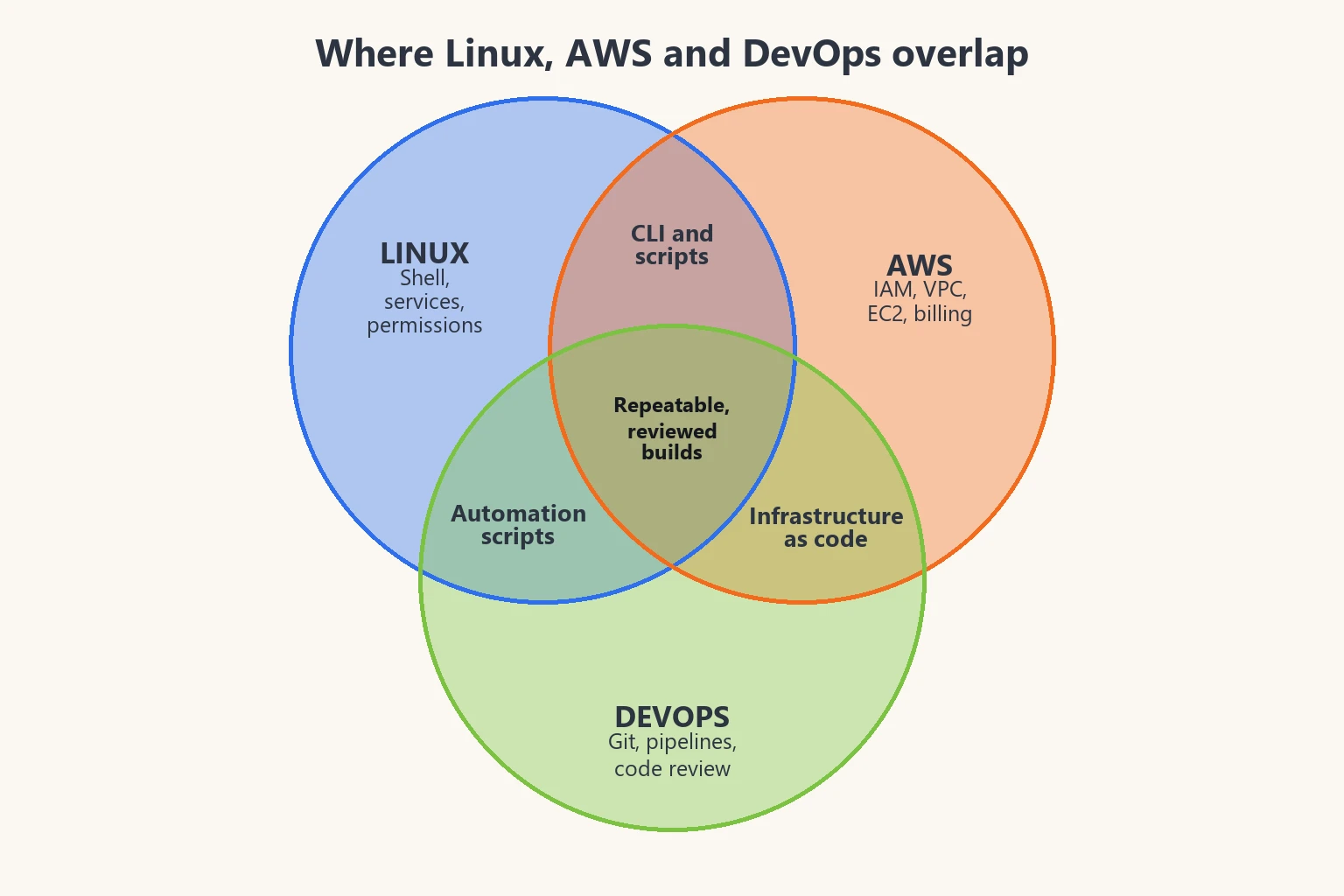
What Each One Is, and Where You Already Overlap
The three are layers, and your current job already touches each of them.
| Area | What it covers here | What a sysadmin usually already has | Typical first gap |
|---|---|---|---|
| Linux | The shell, services and logs, users and permissions, networking from the command line, scripting | A lot if you run Linux servers every day, much less if your estate is mostly Windows | Scripting that handles failure, and reading logs with the tools Linux gives you |
| AWS | Accounts, IAM, VPC networking, EC2, storage, logging and the bill | The ideas carry over: networks, access control, backups, patching. The names and the pay-as-you-go pricing are new | IAM and VPC design, and watching cost |
| DevOps | Version control, automated build, test and release, infrastructure as code, monitoring | Monitoring and an on-call habit. Change work is usually still done by hand | Git, a first pipeline and describing a server as code |
The last two columns are judgement from how sysadmin work usually looks, not survey results. Your own gap may differ, which is what the self-check below is for. AWS describes DevOps as the combination of cultural philosophies, practices and tools, and lists continuous integration, continuous delivery, infrastructure as code and monitoring among the practices. DevOps is mainly a way of working.
A 20-Minute Self-Check
Answer each question without searching. Yes means you could do it today on a real server or account, not that you once read about it.
- Linux: a service fails to start. Using only its logs and
systemctl, can you find the reason? - Linux: can you write a script that loops over a list of hosts, copes with one being down and exits with a useful code?
- Linux: can you explain who can read a file from its owner, group and mode, and fix it without
chmod 777? - AWS: can you explain what makes a subnet public, using the words route table and internet gateway?
- AWS: can you say why an application should use a role rather than a long-lived access key?
- AWS: do you know where to look to see what the account has cost so far this month?
- DevOps: is your newest script in Git, with a change someone else reviewed?
- DevOps: can you describe what should happen automatically on every commit, from build to test to deploy?
- DevOps: could you rebuild one of your servers from a file in a repository instead of from memory?
Count the no answers in each group of three. The group with the most is where to start. If two groups tie, go in the order Linux, AWS, DevOps. If you answered yes to almost everything, you are further along than this guide assumes, and the plan below is a way to fill in what is left.
Which Order Fits You
| Your starting point | First | Second | Third | Why |
|---|---|---|---|---|
| Mostly Windows servers and a directory service, little Linux | Linux | AWS | DevOps | The shell and its tools are the common language of what comes next |
| Comfortable on Linux, never built anything in a cloud account | AWS | DevOps | Deeper AWS | Your Linux skills transfer straight away, and the new ideas are access, networks and cost |
| Strong on Linux, you have clicked around the AWS console | DevOps practices on AWS | Deeper AWS | Containers | The gap is repeatability: Git, a pipeline and infrastructure as code |
| A mix of on-premises virtual machines and some scripting | Whichever the self-check shows is weakest, usually Linux | AWS | DevOps | Close the weakest layer so the next one stands on something solid |
This is judgement based on how the topics depend on each other. If your self-check disagrees with a row, trust the self-check.
If Linux Comes First: What to Fix
Skip what you already know and look for the habits a cloud or pipeline job leans on every day.
- Services and logs: start, stop and enable a service with
systemctl, and read its history withjournalctl. - Users and permissions: owners, groups, mode bits and
sudorules, and how to tighten a file instead of opening it up. - Networking from the shell:
ip,ss,digandcurl, enough to say whether a problem is DNS, routing or the service itself. - Scripting: Bash that checks its own errors, takes arguments and can be run again safely.
- Packages and updates: how you patch a fleet without logging in to each machine.
Practise on a virtual machine you can break. Our guides to Linux for cloud and to Linux commands every cloud and DevOps engineer should know go through the commands in more detail.
If AWS Comes First: Map What You Know
Most AWS ideas have a counterpart in the data centre you already run. Learn the counterpart first and the new names get easier.
| What you run today | The AWS idea | What to learn |
|---|---|---|
| VLANs and address ranges | VPC and subnets | A VPC is a virtual network that closely resembles a traditional one. A subnet is a range of IP addresses and sits in a single Availability Zone |
| Routing and the edge gateway | Route tables and the internet gateway | Route tables decide where traffic from a subnet goes, and an internet gateway connects the VPC to the internet |
| Groups and permissions in your directory | IAM roles and policies | Give people and applications temporary access through roles, and grant only what a task needs |
| Shared admin passwords | MFA and root user protection | Require MFA where a long-lived user or the root user is needed, and protect the root user's credentials |
| Hypervisor virtual machines and their disks | EC2 instances and EBS volumes | General knowledge: pick a size, a disk and a network for each instance, and look after snapshots |
| Syslog and monitoring dashboards | CloudWatch logs and metrics | General knowledge: send logs and metrics to one place and alert on them |
AWS's own guidance on IAM best practices asks human users to sign in through federation with temporary credentials, asks workloads to use IAM roles rather than long-term keys, asks for MFA where an IAM user or the root user is needed and asks you to apply least-privilege permissions. Spend your first AWS week on that list. Our post on AWS security best practices is a gentler walk through the same ground.
AWS's guide says the infrastructure administration functions in the console are available through the API and the AWS CLI, so your scripting habits carry over. A first script that lists what is running:
aws ec2 describe-instances \
  --query "Reservations[].Instances[].{Id:InstanceId,State:State.Name,Name:Tags[?Key=='Name']|[0].Value}" \
  --output table
That command is written from the CLI's query syntax and has not been run against an account. Run it in a practice account first and read the output before you trust it.
If DevOps Comes First: Practices Before Tools
If you already live in Linux and have used AWS, the gap is usually repeatability. Do these in order, one at a time, before you meet a long list of tools:
- Put every script you own in Git, and make changes on a branch.
- Add one automatic check on each commit, such as a syntax check on your scripts.
- Let a passing check deploy to a test server, and watch it fail once on purpose.
- Describe one server in code instead of clicking, using Terraform or a similar tool. Our post on Terraform vs Ansible helps with that choice.
Your monitoring and on-call habits already count here. Our post on how system administrators can automate tasks with cloud, DevOps and AI tools covers the day-to-day side of this.
A 12-Week Order Around a Full-Time Job
This plan follows the default order, Linux, then AWS, then DevOps. If your self-check says otherwise, swap the blocks. Plan on a few hours a week, and treat the right-hand column as something you can show a colleague.
| Weeks | Focus | What you should have at the end |
|---|---|---|
| 1 to 4 | Linux: services, logs, permissions, shell scripting | A script that checks disk space and the state of a service on a practice machine and reports clearly when something is wrong |
| 5 to 8 | AWS core: account safety, IAM, VPC, EC2 | A practice account with MFA on the root user, a small VPC and one instance, built and deleted again |
| 9 to 12 | DevOps basics: Git, a pipeline, infrastructure as code | The earlier script and the instance described in a Git repository, with a pipeline that checks every change |
Twelve weeks is a plan for a working person with limited time, and nothing in it guarantees readiness for a particular role. If you would rather follow a set order than build your own, MicroDegree lists its programs, and they are one option to compare.
Keep the Bill Small While You Practise
AWS charges for what you use, and its Free Tier page said on 23 October 2026 that a new Free Tier account gets $100 in credits at once and can earn up to $100 more. It also said the account closes on its own six months after you open it (earlier if the credits run out), that the free plan is limited to selected services, and that the paid plan reaches every service and is billed for usage. Terms change, so read the page before you sign up.
- Use a separate practice account. Keep it apart from any account your employer owns, and never put real company data in it.
- Set a budget alert on day one. The Free Tier page does not mention budgets, so this is general advice, and a good first thing to look up in the billing console.
- Delete what you create at the end of each session, and check that it is gone.
- Protect the root user with MFA before anything else.
What It Does for Pay
The table shows pay in lakh rupees a year (₹ LPA) from Payscale's India pages for three titles that sit close to this topic. The titles are not identical to the three skills, and the sample sizes differ a lot, so read the numbers as a rough picture. Payscale's pages were read on 23 October 2026. They gave no Bangalore figure, so the table is India-wide.
| Payscale job title | Entry level | 1 to 4 years | 5 to 9 years | Overall average (profiles) | 10th to 90th percentile |
|---|---|---|---|---|---|
| Linux System Administrator | 2.5* (48) | 5.0* (89) | 7.6 (39) | 5.8 (120) | 2.9 to 20 |
| DevOps Engineer | 4.5* (80) | not enough data | not enough data | 10.0 (777) | 4.0 to 30 |
| Cloud Solutions Engineer, AWS skills | not enough data | 6.9* (21) | not enough data (8 salaries) | 7.6 (28) | 2.9 to 30 |
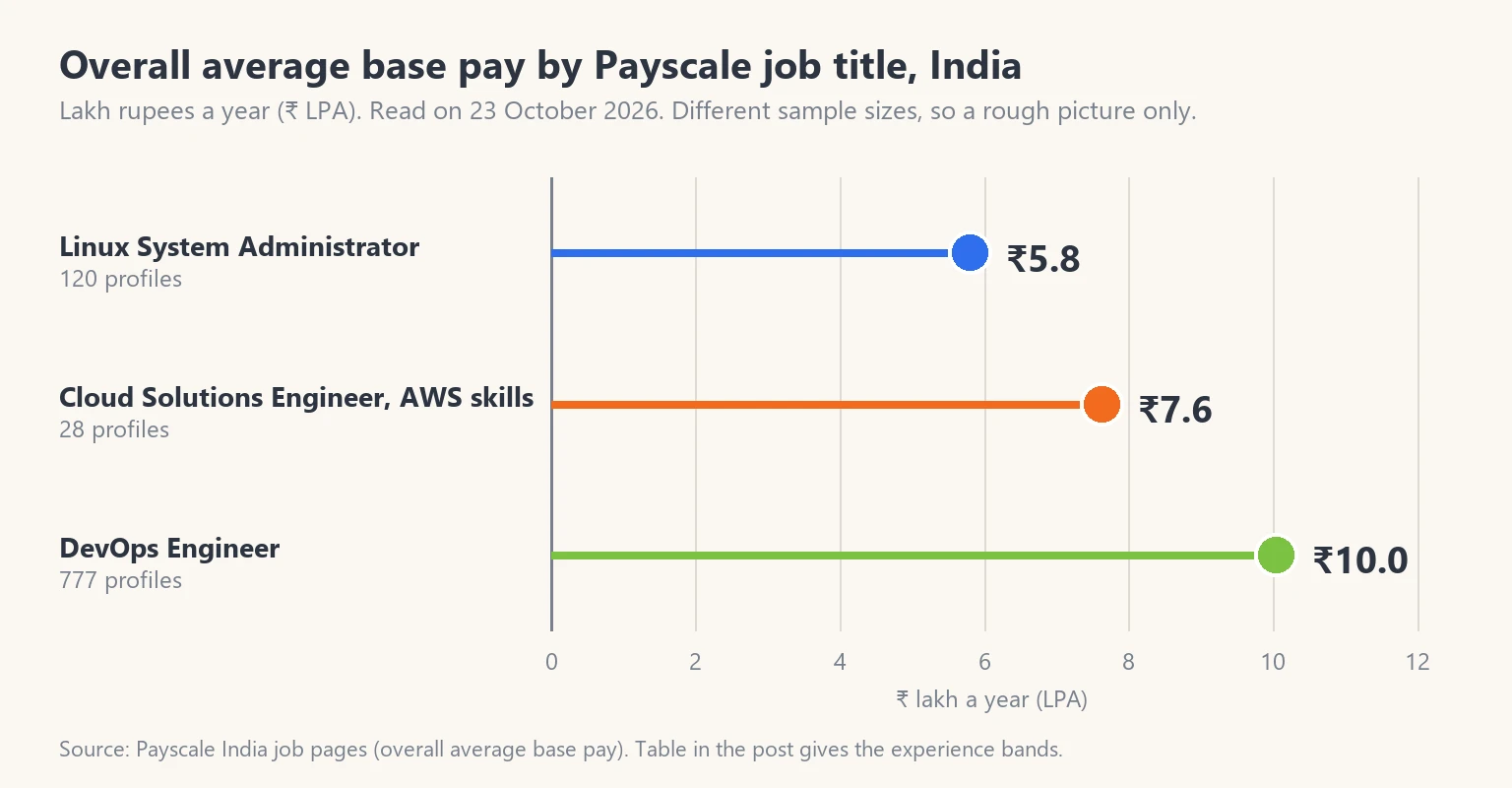
Marked figures (*) are experience-band figures that Payscale labels as total pay on some pages, which can include bonus and overtime, so do not compare them directly with the base-pay figures. Payscale shows its 90th percentile as a rounded figure (₹2m and ₹3m). Where a band had no absolute figure, or only a handful of salaries, the table says not enough data rather than guessing.
In this data the overall average for the DevOps Engineer title is higher than for the Linux System Administrator title, and the spread inside each title is wide. Pay depends on your employer, city, skills and the work you can show. For more on cloud pay, see our post on cloud engineer salary in India.
Mistakes to Avoid
- Starting with Kubernetes before you are comfortable with Linux and networking. Containers make more sense once you know what they are isolating.
- Collecting certificates without building anything. A practice account you can show beats a list of exam names.
- Practising in your employer's AWS account, or with real company data.
- Leaving practice resources running and finding out from the bill.
- Rewriting everything as scripts before putting any of it in Git. Version control comes first because it protects the rest.
Conclusion
Do the self-check, count the no answers, and start where the gaps are. For most system administrators that means Linux depth, then AWS core services, then DevOps practices, with a different order if the self-check says so. Keep practice cheap and separate from work, build something small at each stage and treat pay data as a rough guide. When you want a longer view, our DevOps learning roadmap is a good next read.
FAQs
1. Should a system administrator learn Linux before AWS?▼
If your Linux skills are thin, yes. Many build tools, container images and tutorials assume a Linux shell. The AWS CLI also runs on Windows, so this is about what you will meet next, not a hard requirement. If you already run Linux servers every day, start with AWS and fill gaps as you meet them.
2. Can I learn AWS without knowing DevOps?▼
Yes. You can build in the console and the CLI first. DevOps practices such as Git, pipelines and infrastructure as code are what make that work repeatable, so they are a good next step rather than a prerequisite.
3. Is DevOps a job or a way of working?▼
AWS describes it as a combination of cultural philosophies, practices and tools. Job titles use the word in different ways, so read the duties in each advert rather than the title.
4. Do I need a certification before I start?▼
No. A certification can give you a syllabus to follow, but nothing in this guide depends on one. Practical work you can show matters whichever route you take.
5. How long will the three take?▼
It depends on your starting point and the hours you can give. The 12-week plan above is a pace for a working person and covers the basics only. It does not promise readiness for a role.
Which of the three would you start with?Click here to take a free Cloud & DevOps demo