
CI/CD Projects for Software Testers: Build With Testing Skills
Plenty of testers can write a decent Selenium script. Ask whether they have wired it into a pipeline, though, and the interview gets a bit quiet. Do not worry about it. CI/CD projects for software testers are not a new field you have to start from zero on. You have been doing half of this job for years without calling it that. Before you start, read GitHub Actions best practices, Linux for cloud, and AWS Lambda vs EC2 for the terms and workflows that show up around pipeline work.
Coming up: what a pipeline really looks like from the QA side, the few tools worth installing first, three projects you can wrap up over some weekends, and how to present them so a recruiter does not tune out.
Table of Contents
▼Why Your Testing Skills Are a Strong Starting Point for CI/CD
Think of a normal day on a test team. A ticket comes in, you try to work out what could go wrong, run your checks, write down what broke, and then have that slightly awkward talk about whether the build can ship. That is all a pipeline is doing. It just does not wait around for somebody to press Run.
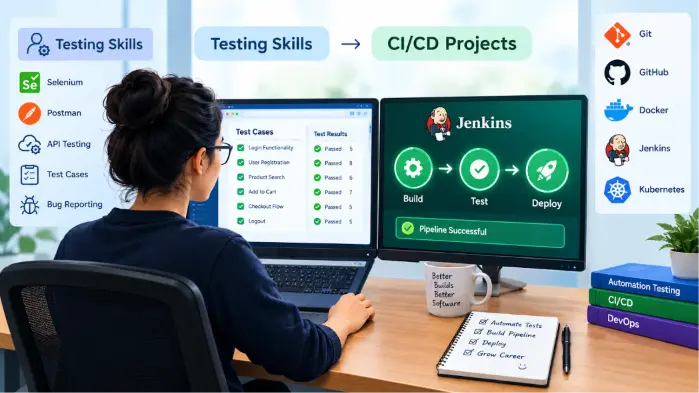
Build, test, report, deploy. You already do these, they just have new labels. Testers who have fought with flaky environments and terrible test data often pick up Jenkins faster than developers who never had to care. So going from automation testing to DevOps is not really a leap. You are doing the same things, only on a bigger stage.

What a CI/CD Pipeline Means for QA Engineers
Continuous integration means people merge their code into a shared repository often, and every merge sets off a build and a round of tests. Continuous delivery, or deployment on some teams, then takes a build that passed and nudges it toward staging or production without much hand-holding.
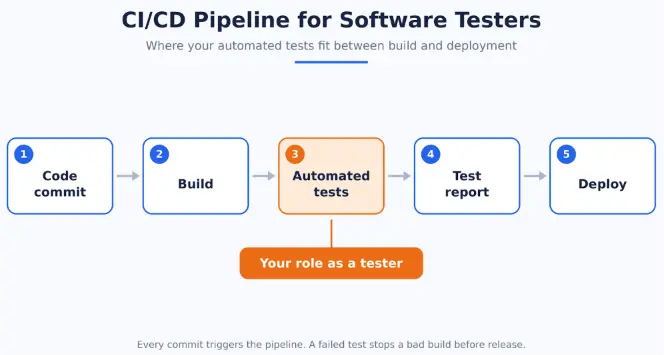
Picture it as a chain of steps: commit, build, test, report, deploy. Why run tests there instead of on your own machine? Because nobody forgets to run them. A bug shows up ten minutes after the commit, while the developer still remembers what they touched. And a red build can block a release, which is the closest thing software has to a real quality gate. QA people tend to care most about that last part, and rightly so.
Tools You Need for Your First CI/CD Project
Most DevOps roadmaps throw a huge tool list at you. Ignore most of it for now. Still, a rough idea of what each piece does is handy. Git and GitHub store the code and trigger the build. Jenkins or GitHub Actions run the pipeline. Maven, Gradle or npm handle dependencies and build steps. Selenium, Playwright or Cypress drive the UI tests, and the Postman CLI handles APIs from the command line. Docker packages the environment. Something like Allure turns results into a report you can actually read.
You do not need to master all of that first, and nobody sensible expects it. Start with Git, Jenkins and whichever automation framework you already know. The rest can wait for project two or three.
| Testing skill | CI/CD skill it supports |
|---|---|
| Writing test cases | Defining pipeline stages and quality gates |
| Automation testing | Running test suites through Jenkins or GitHub Actions |
| API testing | Adding API validation stages to the pipeline |
| Defect reporting | Reading build logs and identifying failed stages |
| Test environments | Creating repeatable environments using Docker |
| Regression testing | Scheduling nightly or pre-release test jobs |
CI/CD Project 1: Automate Regression Tests With Jenkins
Start here. It is the most useful of the three, and it works as a Jenkins pipeline project for automation testers who have never touched a CI server.
The goal is simple: whenever someone pushes code, your UI regression tests run on their own. You will need a Selenium or Playwright framework, a GitHub repository, Jenkins and some kind of reporting.
- Push your framework to GitHub and tidy the folders with a README while you are there.
- Install Jenkins with the Git, Pipeline and reporting plugins.
- Create a pipeline job that points at the repository.
- Add a Jenkinsfile with checkout, build, test and report stages.
- Set up a GitHub webhook so every push triggers the job.
- Publish the report and archive screenshots from any failed test.
pipeline {
  agent any
  stages {
    stage('Checkout') {
      steps {
        checkout scm
      }
    }
    stage('Install dependencies') {
      steps {
        sh 'mvn clean install -DskipTests'
      }
    }
    stage('Run tests') {
      steps {
        sh 'mvn test'
      }
    }
    stage('Generate report') {
      steps {
        sh 'mvn allure:report'
      }
    }
  }
  post {
    always {
      archiveArtifacts artifacts: 'screenshots/**', allowEmptyArchive: true
    }
  }
}
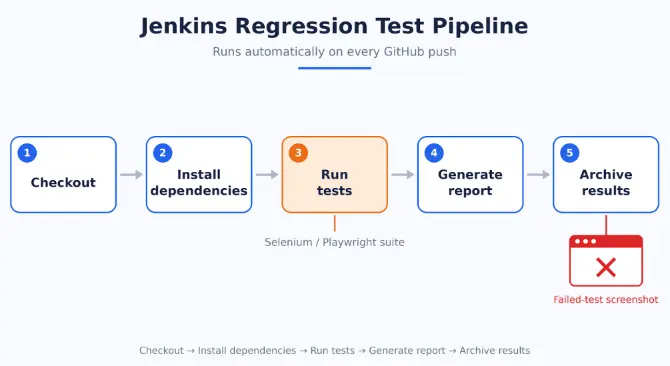
Quick recap of the flow: checkout, install dependencies, run tests, generate report, archive results. If you have been hunting for how to build a CI/CD pipeline using Selenium and Jenkins, honestly, that one Jenkinsfile covers it.
When it works, break a test on purpose. Seeing the build turn red and a screenshot show up in the archive is weirdly satisfying. For most people, that is when the whole pipeline idea finally clicks.
CI/CD Project 2: API Testing Pipeline With Postman and Jenkins
Once the UI pipeline runs, I would tackle API testing next. API tests are quick, and they do not break every time someone moves a button, so what you get back is more dependable. Pipelines love that sort of thing.
The chain runs like this: Postman collection → Postman CLI → Jenkins job → HTML report → failure notification. Export the collection and environment file from Postman, then run them from the terminal with the Postman CLI. Turn on the HTML reporter so engineers and non-technical stakeholders can both make sense of the results. Last, tell Jenkins to send an email or a Slack message whenever a run fails.
Say you check the login, user creation and order APIs after every commit. A wrong status code or a broken schema turns the build red, and nobody builds on top of a red build for long. A hiring manager can take two things from this project. You know how to test properly, with sensible assertions and clean data. And you can plug that testing into a delivery process without being babysat.
CI/CD Project 3: Docker-Based Test Automation Pipeline
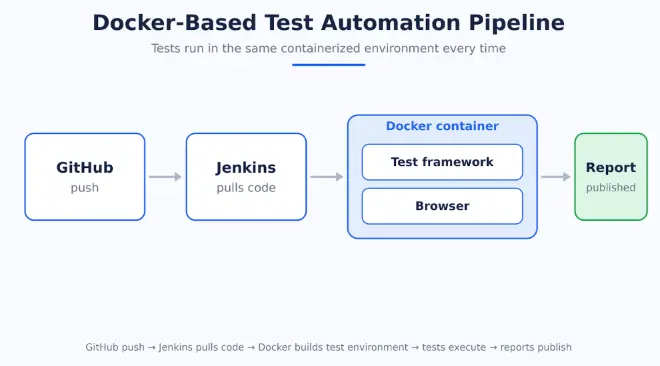
Docker sounds scarier than it is. Think of one sealed box holding your app, a browser and your test framework. It acts the same on your laptop, a teammate's machine and the build server, which kills off the old 'it passed on my machine' excuse.
The project: package your test framework in a container, run the tests inside Docker and connect the lot to Jenkins. The flow goes: GitHub push → Jenkins pulls code → Docker builds test environment → tests execute → reports publish.
- Start with the Dockerfile and run the tests in a container by hand until they pass every time.
- Once the container works on your machine, call the same commands from a Jenkins stage.
- If you are feeling bold, try Selenium Grid on Docker to run browsers in parallel and shrink the pipeline time.
This is where your QA skills really pay off. Test infrastructure used to be a chore you avoided. In an automated pipeline, it becomes part of the product quality story. That is the exact mindset employers want to see from someone who knows how to test and deliver.
How to Present Your CI/CD Projects in a Professional Portfolio
A portfolio matters more than a long list of tools. A recruiter wants to know how you think, not just whether you know the names of a few commands. Keep each project focused on a real problem and a real result.
- Show the GitHub repo and the pipeline flow.
- Explain which tests run, when they run and what they protect.
- Include a screenshot of the failing build or the generated report.
- Write down what broke, what you fixed and what the pipeline prevented.
- Link the project to a real business goal such as faster release, fewer regressions or cleaner deployments.
A strong project summary
Automated Selenium regression tests in Jenkins so every GitHub push runs the suite, publishes the report and archives screenshots when a build fails. This reduces manual check effort and catches regressions before release.
Conclusion
The jump from testing to CI/CD is smaller than it looks. You already know how to think in terms of risk, quality gates and failures. The extra layer is wiring that into a repeatable delivery process. Start with Jenkins, keep the project small, and build something you can explain clearly to a hiring manager or interviewer.
FAQs
1. Do software testers need to learn DevOps from scratch?▼
No. Your current work already gives you the hardest part: you know what a failure looks like, how to validate it and when a build should stop. CI/CD adds automation and delivery flow on top of that background.
2. Which CI/CD project should a tester build first?▼
Start with a Jenkins regression pipeline. It is the closest match to your existing skill set and easiest to explain in interviews.
3. Should I use Jenkins or GitHub Actions first?▼
Use whichever tool matches your current environment. Jenkins is a very practical first project because it is easy to explain and very visible in hiring conversations.
4. Does Docker matter for QA roles?▼
Yes, because it creates repeatable test environments and reduces the classic 'works on my machine' problem. It is one of the clearest ways to show you can think beyond a single laptop setup.
5. How do I make this useful on my resume?▼
Frame the work as a quality system: automated checks, pipeline reporting, environment consistency and faster release confidence, not as a random set of tools.
Want a first look at how this path fits your testing background?Click here to take a free Cloud & DevOps demo