
CKA Practice Guide: 20 Kubernetes Tasks You Should Master Before the Exam

Quick Summary
The CKA Practice Guide focuses on preparing for the Certified Kubernetes Administrator exam through hands-on practice rather than theory or command memorization. It covers 20 practical tasks, including workloads, scheduling, networking, security, storage, cluster administration, and troubleshooting. Troubleshooting is especially important because it carries 30% of the exam, the highest domain weighting.
The guide recommends practicing a workflow of status → events → logs → configuration → dependencies → fix → verify. Overall, candidates should repeatedly practice creating, inspecting, modifying, troubleshooting, and verifying Kubernetes resources under time pressure.
If you are preparing for the Certified Kubernetes Administrator exam, reading Kubernetes documentation is useful, but it is not enough.
The CKA evaluates your ability to solve Kubernetes administration problems from the command line. CNCF describes it as a performance-based exam where candidates solve multiple problems in a command-line environment within two hours.
That means your preparation should look less like memorizing theory and more like working on a real cluster.
You should be able to create a workload, inspect it, modify its configuration, verify the result, and investigate it when something fails.
This guide gives you 20 practical Kubernetes practice tasks to build that ability.
Table of Contents
▼What Does the CKA Exam Test?
The current CKA exam is divided into five major areas:
| Domain | Weight |
|---|---|
| Cluster Architecture, Installation & Configuration | 25% |
| Workloads & Scheduling | 15% |
| Services & Networking | 20% |
| Storage | 10% |
| Troubleshooting | 30% |
This distribution tells you something important about your preparation.
You should not spend all your time learning how to create Deployments and Pods. Troubleshooting alone accounts for 30% of the exam, so you also need to become comfortable diagnosing problems.
For example, if a Pod is stuck in Pending, a Service has no endpoints, or a node becomes unavailable, you should have a systematic way of finding the cause.
20 CKA Practice Tasks You Should Master
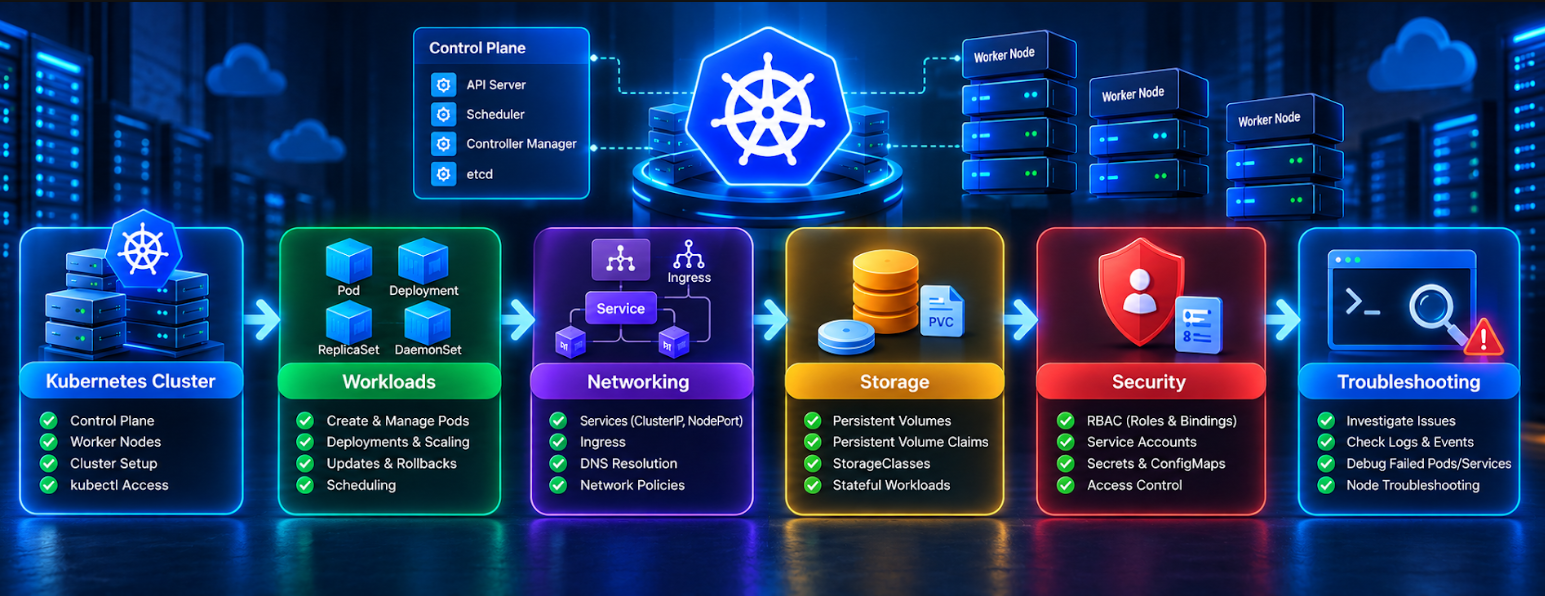
The following tasks cover the major skills you should repeatedly practice before taking the CKA.
Workloads and Scheduling
1. Create and Inspect a Pod
A Pod is the smallest deployable compute unit in Kubernetes, so it is a good place to begin your hands-on practice. Create a simple Pod first, then check its status and details to see how Kubernetes reports its current state.
kubectl run web-pod --image=nginx
kubectl get pod web-pod
kubectl describe pod web-pod
Don't just check whether the Pod is running. Look at the status and Events as well. If the Pod fails to start, these details can give you useful clues about what went wrong.
2. Create and Scale a Deployment
A Deployment is used when an application needs multiple running Pods. It keeps track of the desired number of replicas and also provides a controlled way to manage application changes.
kubectl create deployment web-app --image=nginx --replicas=3
kubectl get deployment
kubectl get pods
Once the Deployment is up, change the number of replicas:
kubectl scale deployment web-app --replicas=5Check the Pods again and see how the change is reflected in the cluster. It is also worth understanding how the Deployment, its ReplicaSet, and the Pods it manages fit together.

3. Perform a Rolling Update and Rollback
Deployments are designed to make application updates easier to manage. Practice changing the image of the running Deployment and watch how Kubernetes handles the rollout.
kubectl set image deployment/web-app nginx=nginx:1.27
kubectl rollout status deployment/web-app
After the update, check the Deployment's revision history: kubectl rollout history deployment/web-app
Then try returning to the previous version: kubectl rollout undo deployment/web-app
This gives you practice with both updating a workload and reversing the change when needed.
4. Schedule Pods Using Labels
Kubernetes labels can help you control which nodes are suitable for a particular Pod. Start by adding a label to a node: kubectl label node node01 disktype=ssd
You can then refer to that label in the Pod specification using nodeSelector:
spec:
  nodeSelector:
    disktype: ssd
Once you have tested nodeSelector, try node affinity, taints, and tolerations as well. These features are all related to Pod scheduling, but each one handles a different type of placement requirement.
5. Configure Taints and Tolerations
Taints can prevent Pods from being scheduled on particular nodes unless those Pods have a matching toleration.
For example: kubectl taint nodes node01 dedicated=database:NoSchedule
Now create one Pod without a matching toleration and another with one. Observe where Kubernetes schedules them.
Networking and Security
6. Expose an Application With a Service
Pods can be replaced, so their IP addresses should not be treated as permanent application endpoints. Services provide a stable way to access a group of Pods.
kubectl expose deployment web-app \
  --name=web-service \
  --port=80 \
  --target-port=80
Then inspect:
kubectl get svc
kubectl get endpointslices
7. Troubleshoot Service Connectivity
Create a Deployment and Service, then intentionally change the Service selector so that it no longer matches the Pods.
Investigate the problem using:
kubectl get pods --show-labels
kubectl describe svc web-service
kubectl get endpointslices
This is an excellent CKA practice task because the Service itself can appear healthy while having no usable backends.
8. Test Kubernetes DNS
Create a Service and use a temporary Pod to test Service-name resolution.
kubectl run dns-test \
  --image=busybox:1.36 \
  --restart=Never \
  -- sleep 3600
kubectl exec -it dns-test -- nslookup web-service
Also practice DNS resolution across namespaces to understand Kubernetes Service discovery.
9. Create a NetworkPolicy
NetworkPolicies control traffic between Pods when supported by the cluster networking implementation.
Start with a default-deny policy:
apiVersion: networking.k8s.io/v1
kind: NetworkPolicy
metadata:
  name: deny-ingress
spec:
  podSelector: {}
  policyTypes:
    - Ingress
Then practice allowing only required traffic, such as frontend-to-backend while blocking direct frontend-to-database access.
10. Configure RBAC
RBAC controls which users or service accounts can perform actions on Kubernetes resources.
Create a ServiceAccount and test its permissions:
kubectl create serviceaccount viewer
kubectl auth can-i get pods \
  --as=system:serviceaccount:default:viewer
Practice both allowed and denied actions to understand authorization.

Storage and Cluster Administration
11. Create a PersistentVolume and PVC
A PersistentVolume provides storage, while a PersistentVolumeClaim requests storage.
kubectl get pv
kubectl get pvc
Create a PVC, mount it into a Pod, and verify that the application can write data.
12. Work With StorageClasses
Practice identifying StorageClasses and troubleshooting PVCs that remain Pending.
kubectl get storageclass
kubectl describe pvc <name>
kubectl get pv
This helps develop the diagnostic skills needed for storage problems.
13. Perform Node Maintenance
Practice cordoning, draining, and uncordoning a node.
kubectl cordon node01
kubectl drain node01 --ignore-daemonsets
kubectl uncordon node01
Use a multi-replica deployment and observe how Kubernetes handles workloads when a node is drained.
14. Inspect Cluster and Node Configuration
Practice checking the cluster and individual node details.
kubectl get nodes
kubectl describe node node01
Pay attention to node conditions, taints, resource allocation, and Events, especially when workloads cannot be scheduled.
15. Practice etcd Backup and Restore
etcd stores critical Kubernetes cluster state. Practice the complete recovery workflow:
Identify etcd → Locate certificates → Take snapshot → Verify backup → Restore → Verify cluster state
The exact commands and certificate paths depend on the cluster configuration, so focus on understanding the workflow rather than memorizing one command.
16. Practice kubeadm Cluster Upgrades
If your lab uses kubeadm, understand the roles of the control plane, worker nodes, kubeadm, kubelet, and kubectl.
Check the current versions:
kubeadm version
kubelet --version
kubectl version
Then follow the Kubernetes documentation for the specific version transition you are practicing.
17. Configure ConfigMaps and Secrets
ConfigMaps store non-sensitive configuration, while Secrets are used for sensitive values.
kubectl create configmap app-config \
  --from-literal=APP_ENV=production
kubectl create secret generic app-secret \
  --from-literal=DB_PASSWORD=secret123
Practice using them inside a Pod as environment variables or mounted files.
18. Configure and Troubleshoot Ingress
Practice routing external HTTP/HTTPS traffic to Services using hostnames or URL paths.
example.com/frontend → frontend-service
example.com/backend  → backend-service
Inspect the configuration with:
kubectl get ingress
kubectl describe ingress <ingress-name>
Remember that an Ingress resource requires an appropriate Ingress controller to implement the routing.
19. Troubleshoot a Failing Pod
Practice diagnosing Pods in states such as Pending, CrashLoopBackOff, ImagePullBackOff, or ErrImagePull.
kubectl get pods
kubectl describe pod <pod-name>
kubectl logs <pod-name>
kubectl logs <pod-name> --previous
20. Troubleshoot an Unhealthy Kubernetes Node
A worker node can become unavailable or enter a NotReady state.
kubectl get nodes
kubectl describe node <node-name>
Check node conditions, taints, resources, and Events. In a kubeadm-based cluster, also inspect the kubelet:
systemctl status kubelet
journalctl -u kubelet
Practice identifying the cause and verifying that the node becomes usable again.
How to Practice Kubernetes Troubleshooting
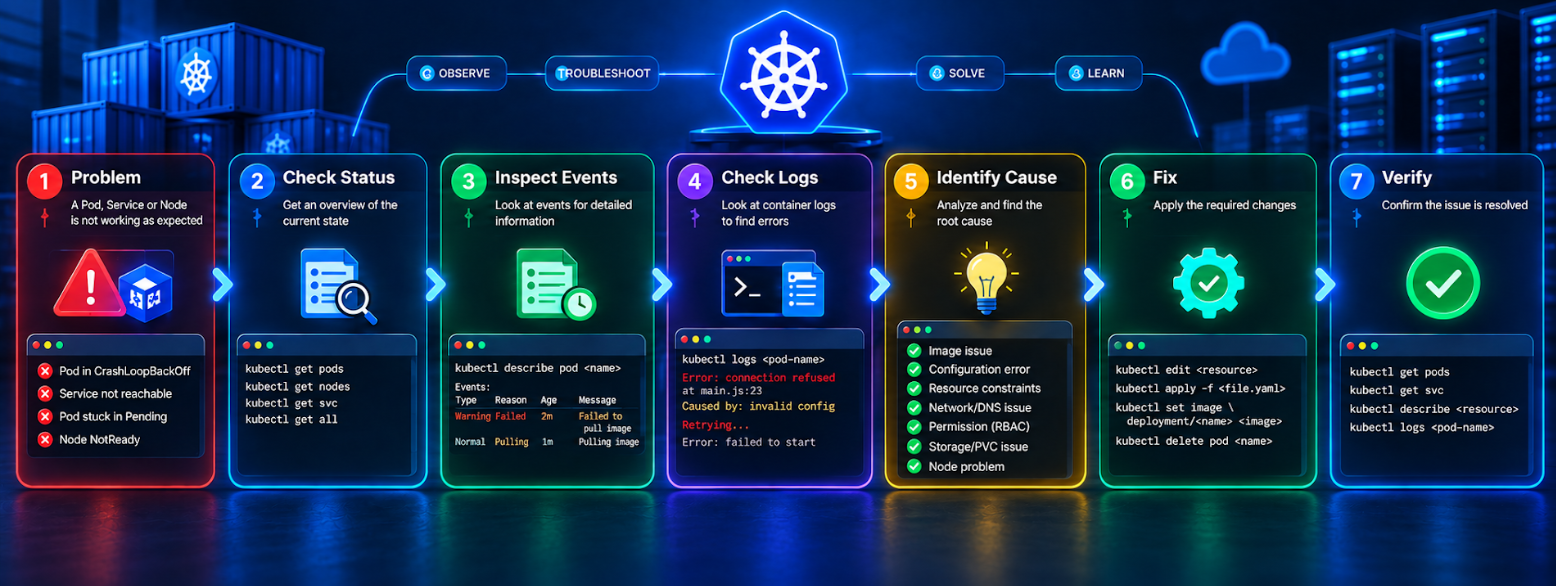
Troubleshooting deserves special attention because it represents 30% of the current CKA exam weighting.
Instead of only practicing successful deployments, deliberately create broken scenarios.
For a failing Pod, start with:
kubectl get pods
kubectl describe pod <pod-name>
kubectl logs <pod-name>
For a previous container instance: kubectl logs <pod-name> --previous
For a Service problem, inspect:
kubectl get svc
kubectl describe svc <service-name>
kubectl get endpointslices
For a node problem:
kubectl get nodes
kubectl describe node <node-name>
The important habit is to troubleshoot systematically:
Status → Events → Logs → Configuration → Dependencies → Fix → Verify
If you want structured practice beyond individual commands, MicroDegree's learning platform can also be used to continue building practical Cloud, DevOps, and Kubernetes skills. Explore MicroDegree Learning.
A Practical CKA Exam Preparation Strategy
A good preparation routine can be divided into four stages.
- Build Kubernetes fundamentals. Learn Pods, Deployments, Services, namespaces, labels, ConfigMaps, Secrets, volumes, and basic scheduling.
- Practice each CKA domain separately. Spend dedicated sessions on workloads, networking, storage, cluster administration, and troubleshooting.
- Combine the skills. For example, deploy an application, expose it with a Service, add storage, restrict network access, and then deliberately introduce a configuration problem.
- Introduce time pressure. Instead of solving tasks with unlimited time, create timed practice sessions. The objective is to develop a repeatable workflow: read the requirement, identify the resource, make the change, and verify it.
This approach is particularly useful for working IT professionals who are balancing certification preparation with their regular responsibilities.
Conclusion
The most useful takeaway from this CKA Practice Guide is that CKA preparation should be based on repetition and troubleshooting—not command memorization.
Practice the core Kubernetes resources until creating and inspecting them becomes routine. Then make your labs harder by introducing scheduling, networking, storage, access-control, and node failures. Remember that troubleshooting currently carries the largest CKA domain weighting at 30%, so make it a regular part of your preparation rather than something you study at the end.
Once you can consistently create, inspect, modify, troubleshoot, and verify Kubernetes resources under time pressure, you are building the practical skills the CKA is designed to assess.
For professionals looking to strengthen Kubernetes alongside broader Cloud and DevOps capabilities, continue your practical upskilling with MicroDegree Learning.
FAQs
Q1: Do I need prior Kubernetes experience before taking the CKA?▼
Prior Kubernetes experience is not an absolute requirement, but having a basic understanding of Linux, containers, networking, and Kubernetes concepts will make preparation much easier. Since the CKA is hands-on, familiarity with the command line and basic system administration can also help you work through practical tasks more confidently.
Q2: Is the CKA suitable for someone moving into a DevOps career?▼
Yes. The CKA focuses on practical Kubernetes administration skills that are relevant to many DevOps and cloud engineering environments. Preparing for the certification can help you build experience with workloads, networking, storage, cluster administration, access control, and troubleshooting.
Q3: How difficult is the CKA for someone new to Kubernetes?▼
The CKA can be challenging for someone who has only studied Kubernetes theoretically. The difficulty mainly comes from having to solve practical problems under time pressure. Building a practice environment and repeatedly performing common administration and troubleshooting tasks can make the learning process much more manageable.
Q4: How long does it usually take to prepare for the CKA?▼
Preparation time varies depending on your existing Linux, Docker, Kubernetes, and DevOps experience. Someone with practical container and Linux experience may progress faster, while a newcomer may need more time to build the fundamentals first.
Q5: Is the CKA useful for Cloud and DevOps professionals?▼
The CKA can be useful for professionals who work with Kubernetes-based infrastructure or want to develop Kubernetes administration skills. It provides a structured way to demonstrate knowledge of cluster management, workloads, networking, storage, security, and troubleshooting — skills that can complement broader Cloud and DevOps experience.
Ready to strengthen your Kubernetes skills?
Reading about Kubernetes is a good start, but hands-on practice is what builds real confidence. Continue your CKA exam preparation with practical Cloud, DevOps, and Kubernetes learning resources from MicroDegree.