
How to Become a DevOps Engineer After IT Support Experience (3–5 Years)

To become a DevOps engineer after IT support experience, you start from a stronger position than someone changing careers cold. After three to five years you have worked real queues, handled incidents under pressure and explained faults to people who just wanted their system back. What you may not have yet is a record of building and automating things.
The short answer for a DevOps engineer after IT support experience: pick a route into the work, then produce proof from your own tickets. This guide shows that with one repeating ticket turned into a script, a schedule and a pipeline, then covers what to learn next, how to talk about the work in interviews and what pay looks like from named sources.
Table of Contents
▼What Three to Five Years Changes
A fresher with a DevOps course has a certificate and a lab. You have a history: you know which faults come back, which ones page you at night and which fixes people avoid because they are manual and risky. DevOps work is largely about removing that kind of repeat work, so your history is the raw material.
It also raises the bar a little. At this stage a course certificate alone will not carry an application. Interviewers will ask what you automated, what you changed and what broke. The rest of this guide is about collecting those answers while you still hold your current job.


Three Ways In: Stay, Rotate or Switch
Most people at your stage take one of three routes, and none is the single right one.
| Route | What it looks like | The catch |
|---|---|---|
| Stay and automate | Take on scripting and tooling inside your support role, then ask for a DevOps or SRE seat on your own team | Depends on your company having that seat; some do not |
| Rotate | Ask to join a platform, infrastructure or release team for a project or a rotation | Needs a manager who will release you, and a clear case for what you can do there |
| Switch employers | Apply for DevOps, SRE or cloud support engineer roles elsewhere with a portfolio of what you built | You compete with people whose job title already says DevOps, so the proof has to be visible |
One staffing-firm guide argues that contract roles through an agency are the fastest way to real DevOps experience. That firm sells that service, so treat it as one view and ask any agency what tools the actual team uses. Whichever route you choose, the next section applies, because all three need the same thing: evidence that you can build.
Mine Your Own Ticket History
You do not need to invent a project. Export or scroll through the last few months of your tickets and look for the one that keeps coming back: disk full, a certificate about to expire, a service that needs a restart, an access request that always follows the same steps. Pick one, and read it the way a DevOps engineer would.
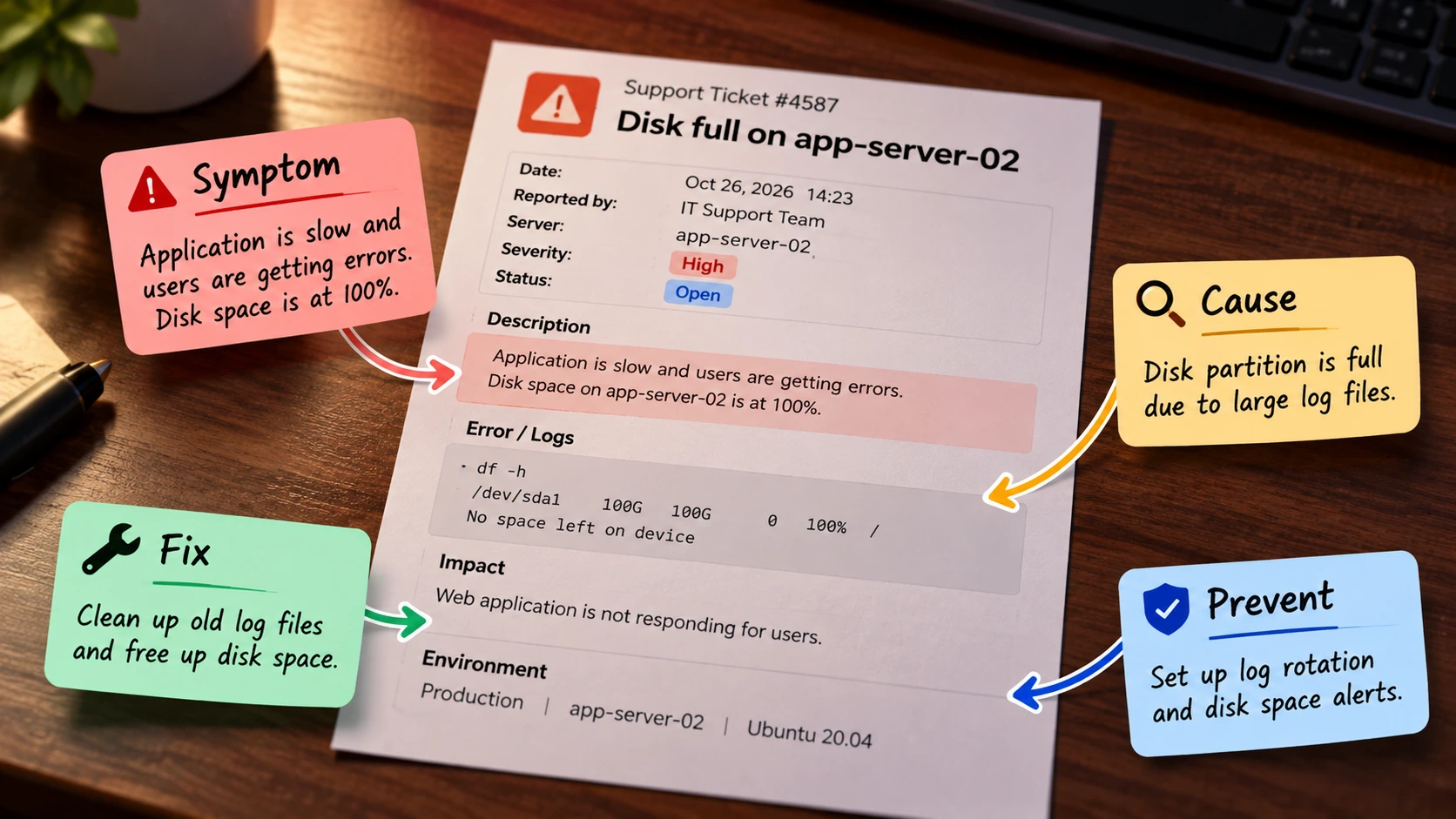
A Worked Example: From a Disk Full Ticket to a Script, a Schedule and a Pipeline
Say the ticket is "Disk full on app-server-02", and you have cleared it by hand three times this quarter. The symptom is the full disk and the fix is the cleanup you already know. What you have not done is Prevent: finding out earlier. Start with a small script that checks a mount point and exits with an error when usage crosses a limit.
#!/usr/bin/env bash
# disk-check.sh: warn when a mount point is nearly full.
# Usage: ./disk-check.sh /var 85
mount_point="${1:-/}"
limit="${2:-85}"

used=$(df -P "$mount_point" | awk 'NR==2 {gsub("%", "", $5); print $5}')

if [ "$used" -ge "$limit" ]; then
  echo "WARNING: $mount_point is ${used}% full (limit ${limit}%)"
  exit 1
fi
echo "OK: $mount_point is ${used}% full"
The script reads the used percentage that df reports for a mount point and compares it with a limit you pass in. It prints OK and exits 0 below the limit, and prints a warning and exits 1 at or above it. Next, schedule it so it runs without you.
# crontab -e: run the check every 15 minutes and log the result
*/15 * * * * /opt/scripts/disk-check.sh /var 85 >> /var/log/disk-check.log 2>&1
The last step is what turns a personal script into engineering work: keep it in a Git repository and let a pipeline check it on every push. GitHub Actions can run ShellCheck, a linter for shell scripts. GitHub lists ShellCheck as installed on its Ubuntu 24.04 runner image, but check the current image notes for the runner label you use.
# .github/workflows/lint.yml
name: lint-scripts
on: [push, pull_request]

jobs:
  shellcheck:
    runs-on: ubuntu-latest
    steps:
      - uses: actions/checkout@v6
      - run: shellcheck disk-check.sh
None of this is advanced, but you now have a repo, a pipeline and a before-and-after for a real recurring fault, and an interviewer can ask about each piece. Later you can swap the cron line for a monitoring alert or move the check into a configuration tool.
What to Learn Next, in the Order Your Tickets Ask for It
After the first script, let the next gap decide the next topic. A rough order that follows from the example:
- Git properly: branches, pull requests and reading a diff. The pipeline above is useless without it.
- Linux and scripting depth: processes, permissions, systemd, logs, and one language such as Python for jobs that outgrow Bash.
- One cloud platform: virtual machines, storage, networking and identity. Move your disk check to a cloud VM.
- Docker: package the script or a small app, then run it the same way everywhere.
- Infrastructure as code with Terraform: create the VM from a file instead of from the console.
- Monitoring and alerting: replace the cron email with a real alert, and learn to read metrics and logs.
- Kubernetes basics, once containers feel normal.
Certifications help when they follow practice. AWS recommends at least one year of hands-on experience designing solutions on AWS for its Solutions Architect Associate exam, and says people with 1 to 3 years of IT experience have passed it as a starting point. The Certified Kubernetes Administrator exam is performance-based, done from a command line over 2 hours, and the Linux Foundation lists no prerequisites. Its biggest domain by weight is troubleshooting at 30%, which suits people who spend their days diagnosing faults. Our guides on Linux commands for cloud and DevOps engineers and the Terraform roadmap cover two of the steps above in more detail.
Which Job Titles to Search For
Do not search only for "DevOps engineer". Titles differ by company, and several guides point to neighbouring roles that fit a support background: site reliability engineer, platform engineer, release engineer and cloud support engineer. Read the responsibilities, not the title. If the advert mentions on-call, incident response, monitoring and automation, your history is relevant. If it asks for years of Kubernetes in production, it is aimed higher than where you are today. For application support specifically, our DevOps roadmap for application support engineers covers a close route.
Four Stories to Prepare for the Interview
Interviewers cannot see your queue, so give them stories. Prepare four, each with the situation, what you did and what changed afterwards, and use only things that happened to you.

- Incident: a fault you diagnosed. State the symptom, how you narrowed it down, the cause and how you told the users.
- Automation: the disk check above, or your own version. Say what it replaced and how you know it ran.
- Mistake: something you changed that made things worse, and what you now do before changing production.
- Handover: how you passed a problem to another team, and what you included so they did not have to ask again.
Keep your claims small and true
If you say "I reduced recurring disk tickets", be ready to show the ticket count before and after, or say plainly that you built the check but have no count yet. A smaller true claim holds up better under follow-up questions than a bigger vague one.
What Can DevOps Engineers Earn at Different Experience Levels?
Pay usually increases as engineers gain practical experience and take responsibility for more complex systems. However, salary ranges vary across companies and sources.
For a broad India-wide benchmark, Weekday's October 2026 salary guide gives these estimated total-compensation ranges for metro cities:
| Experience level | Indicative annual compensation |
|---|---|
| Fresher (0–1 year) | ₹5–9 LPA |
| Early career (2–4 years) | ₹12–22 LPA |
| Mid-level (5–7 years) | ₹22–38 LPA |
| Senior (8–11 years) | ₹38–65 LPA |
| Staff/Lead (12+ years) | ₹65 LPA–₹1.1 crore |
The Next 30 Days
- Pick the one repeat ticket and write its four parts: symptom, cause, fix, prevent.
- Build the smallest script that checks for it, and put it in a Git repository.
- Add a pipeline that lints the script on every push.
- Write a short README that says what the script does, how to run it and what it replaced.
- Tell your manager what you built and ask what a DevOps or platform seat on your team would need from you.
If you would like a guided order next to your job, MicroDegree's learning programs are one option to compare. Our guide on moving from technical support to DevOps covers the same ground from the start of a support career.
Conclusion
Three to five years in IT support means you have seen how systems fail in practice. Turn one repeat ticket into a script, a schedule and a pipeline, keep it in a repository you can show, and build outward from there. Each small proof makes the next application easier, and the first one is already in your ticket history.
FAQs
1. Can I become a DevOps engineer from IT support without a degree in computer science?▼
Employers differ, and the guides read for this post focus on skills and proof rather than degrees. A repository showing automation you built and a clear account of your incident work are things you can control.
2. How long does the move take?▼
Guides give estimates from 6 to 18 months, and they do not agree with each other. It depends on your starting point and how many hours a week you can practise, so measure progress by what you have built.
3. Do I need to learn Python or is Bash enough?▼
Bash is enough for the first checks and small jobs. Python helps once a task needs parsing, APIs or tests, so learn it when a real script outgrows Bash.
4. Should I get a certification first?▼
Certifications work best after practice. AWS suggests about a year of hands-on experience for its Solutions Architect Associate exam, and the CKA exam is a hands-on test where practice matters most.
5. Will I earn more as a DevOps engineer?▼
Pay usually rises with experience, as the table above shows, but ranges vary across companies and sources. Treat them as estimates, not a promise for your own move.
Wondering where your support background would fit in?Click here to take a free Cloud & DevOps demo