
Networking From Zero: The Concepts Every IT Professional Must Know
Quick Summary
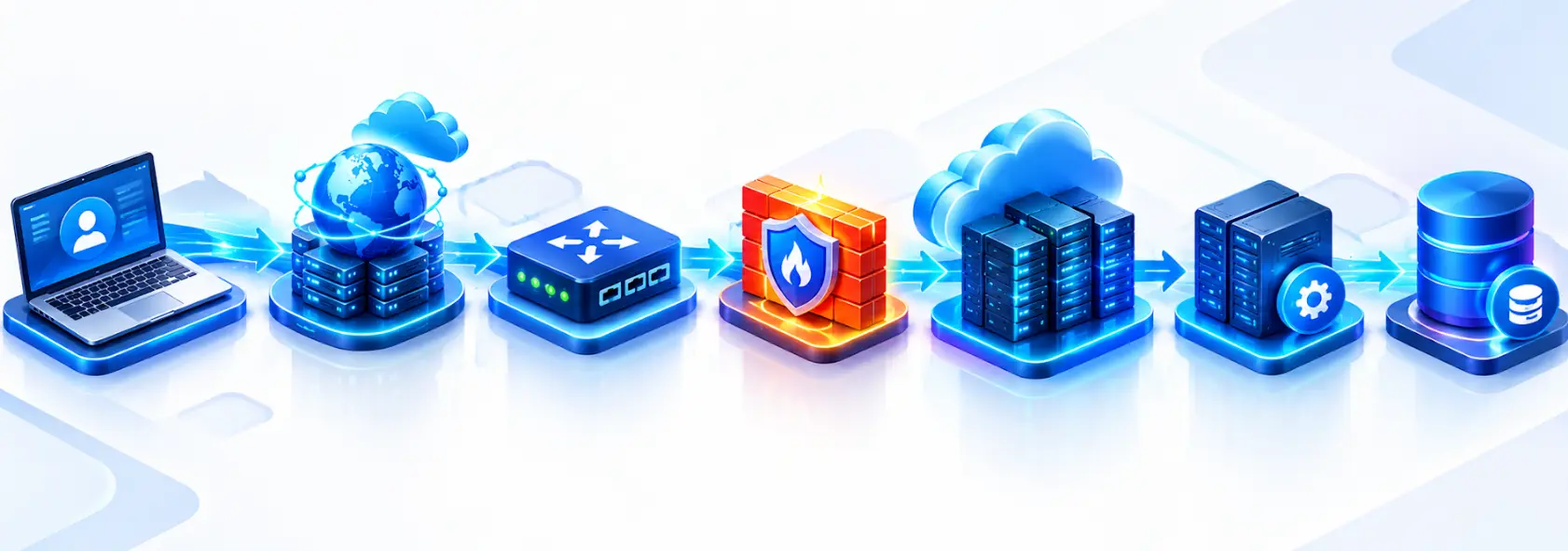
Networking basics explain how computers, applications, servers, cloud resources, and other devices communicate with each other. The most important concepts include IP addresses, DNS, DHCP, ports, TCP, UDP, subnetting, routing, NAT, firewalls, and HTTP/HTTPS.
You do not need to become a network engineer to understand these concepts. Developers use networking when working with APIs and databases, while Cloud and DevOps engineers work with subnets, routing, load balancers, and security controls. Application support engineers also rely on networking knowledge when troubleshooting DNS, connectivity, ports, and HTTP errors.
The easiest way to learn computer networking fundamentals is to understand what happens when one system communicates with another and then connect each networking concept to that process.
You have probably heard terms such as IP address, DNS, TCP, port, router, subnet, and firewall many times.
But knowing these terms individually is different from understanding how they work together.
Consider a simple request such as:
https://api.example.com/usersBefore your application receives a response, the system may need to resolve the domain name, identify the destination IP address, route the traffic, connect to the correct service, establish a secure connection, and exchange HTTP data.
This is why networking knowledge matters far beyond traditional network engineering. If you work in software development, cloud, DevOps, QA, application support, or system administration, networking can help you understand and troubleshoot problems that otherwise appear to be unexplained application failures.
Table of Contents
▼What Are the Networking Basics Every IT Professional Should Know
You should know some networking ideas like IP addressing, DNS, DHCP, subnetting, routing, ports, TCP, UDP, HTTP/HTTPS, switches, routers, gateways, NAT and firewalls. These are the building blocks of how networks work.
You don’t have to learn all of them at the time. Begin by figuring out what each one does. Then see how they work together when data moves from one place to another. Start small builds step by step.
| Concept | Purpose |
|---|---|
| IP address | Identifies a network endpoint |
| MAC address | Identifies a network interface at the link layer |
| Switch | Connects devices within a local network |
| Router | Connects different networks |
| DNS | Resolves domain names to IP information |
| DHCP | Provides network configuration |
| Port | Identifies a service endpoint |
| TCP | Provides reliable, ordered transport |
| UDP | Provides connectionless transport |
| Subnet | Divides a network into smaller networks |
| Firewall | Controls network traffic |
| NAT | Translates network addresses |
| HTTP/HTTPS | Enables web and API communication |
The goal is not to memorize this table. Instead, think about what happens when an application communicates with another system. It needs to identify the destination, determine how to reach it, connect to the required service, and exchange data. Different networking concepts handle different parts of that process.

How IP Addresses, Subnets, and Ports Work Together
An IP address provides logical addressing for network communication. An IPv4 address may look like 192.168.1.20, while IPv6 uses a different format and provides a much larger address space, such as 2001:db8::1.
Private IPv4 addresses are commonly used inside internal networks. The private ranges include 10.0.0.0/8, 172.16.0.0/12, and 192.168.0.0/16. Public IP addresses, meanwhile, can be routed across the public Internet subject to routing and security controls.
What Is a Subnet
A subnet is a smaller logical network created from an IP address range. For example, 10.0.0.0/24 represents an IPv4 block containing 256 addresses.
The /24 is the CIDR prefix length. It indicates how many bits belong to the network prefix and helps determine the size of the network.
Subnetting becomes particularly important in cloud environments. An application may use separate network segments for web servers, application services, and databases:
VPC
│
├── Web Subnet
├── Application Subnet
└── Database Subnet
This separation makes it easier to manage routing and apply different security requirements to different parts of the infrastructure.
What Is a Network Port
An IP address identifies the destination host or endpoint, while a port helps identify the service that should receive traffic on that host.
For example:
192.168.1.20:443Here, 192.168.1.20 is the IP address and 443 is the port.
Commonly encountered ports include 22 for SSH, 53 for DNS, 80 for HTTP, and 443 for HTTPS. Registered service and port assignments are maintained by IANA.
DNS, DHCP, TCP, UDP, and HTTP Explained
Several networking concepts work together whenever an application communicates with another system.
DNS: How Does Your Computer Find a Server
DNS or the Domain Name System translates domain names into IP information. Of requiring users and applications to remember numerical addresses DNS allows them to work with names such as example.com.
When an application requests a domain a DNS resolver helps determine the address associated with that name. If DNS resolution fails the application may be unable to reach the destination when the destination server itself is running normally.
This is why DNS is often one of the things to check when an application cannot connect to a hostname.
DHCP: How Does a Device Get Its Network Configuration
DHCP or Dynamic Host Configuration Protocol automatically provides network configuration to devices joining a network.
Depending on the environment DHCP can provide an IP address, subnet information, default gateway and DNS server information. A common way of remembering the DHCP exchange is DORA: Discover, Offer, Request and Acknowledge.
TCP vs UDP
TCP and UDP are transport-layer protocols but they serve purposes.
TCP provides mechanisms for ordered delivery while UDP is connectionless and has lower transport overhead. UDP does not provide TCP's built-in reliability and ordering mechanisms so applications using UDP handle those requirements differently when needed.
| TCP | UDP |
|---|---|
| Connection-oriented | Connectionless |
| Reliable delivery mechanisms | No TCP-style reliability |
| Ordered delivery | No guaranteed ordering |
| Higher protocol overhead | Lower protocol overhead |
The appropriate protocol depends on what the application requires.
HTTP and HTTPS
HTTP is an application-layer protocol widely used by websites and APIs. HTTPS is HTTP protected using TLS, which provides protection for communication.
When an application calls:
GET https://api.example.com/usersSeveral networking concepts may be involved: DNS identifies the destination IP routing determines how traffic travels a port identifies the service transport protocols that handle communication, TLS protects the connection and HTTP carries the application request.
Understanding this sequence makes API troubleshooting much easier.
How Do Switches, Routers, Gateways, and Firewalls Connect Systems
A switch primarily connects devices within a local network and forwards Ethernet frames using link-layer information such as MAC addresses. A router connects different networks and makes forwarding decisions using IP information.
A default gateway is the next-hop device a host normally uses when it needs to communicate with a destination outside its local network. A firewall controls network traffic according to configured security rules and can allow or block connections based on factors such as source, destination, protocol, or port.
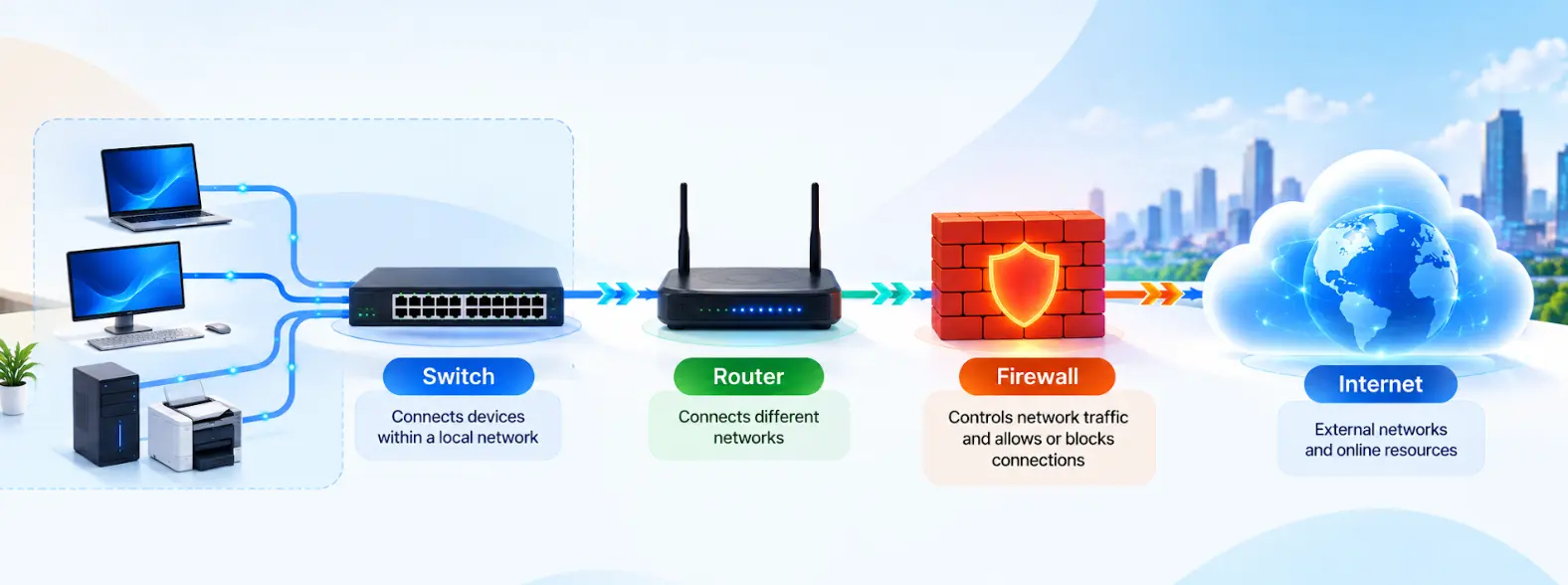
A simple network might look like:
Laptop
   ↓
Switch
   ↓
Router
   ↓
Firewall
   ↓
Internet
The same principles appear in cloud environments, although many components are implemented virtually. For example, AWS VPC route tables determine how traffic is directed from subnets toward destinations such as Internet Gateways, NAT Gateways, VPN connections, or other network resources.
Understanding these concepts makes it easier to move from traditional networking into cloud networking.
Why Is Networking Important for Cloud, DevOps, and Software Development
Networking is not limited to network engineering roles. Modern applications depend on communication between systems so networking is relevant across several IT careers.
For software developers networking appears when applications connect to APIs, databases, authentication services, message brokers and third-party platforms. If an API request fails the cause may involve DNS, routing, ports, TLS or firewall rules rather than application code.
For Cloud Engineers networking is central, to networks, subnets, route tables, load balancers, private connectivity and security controls. For DevOps Engineers networking appears in containers, Kubernetes, CI/CD systems, service discovery, ingress, load balancing and infrastructure automation.
Application support engineers also benefit from networking knowledge because production incidents frequently involve connectivity, DNS, ports, HTTP responses or service availability.
If you are building Cloud or DevOps skills networking should be part of your foundation. You can explore practical learning resources through MicroDegree's FREE E-learning platform.
How Can You Troubleshoot Common Network Problems
Networking knowledge becomes especially valuable when something stops working.
Suppose an application cannot connect to:
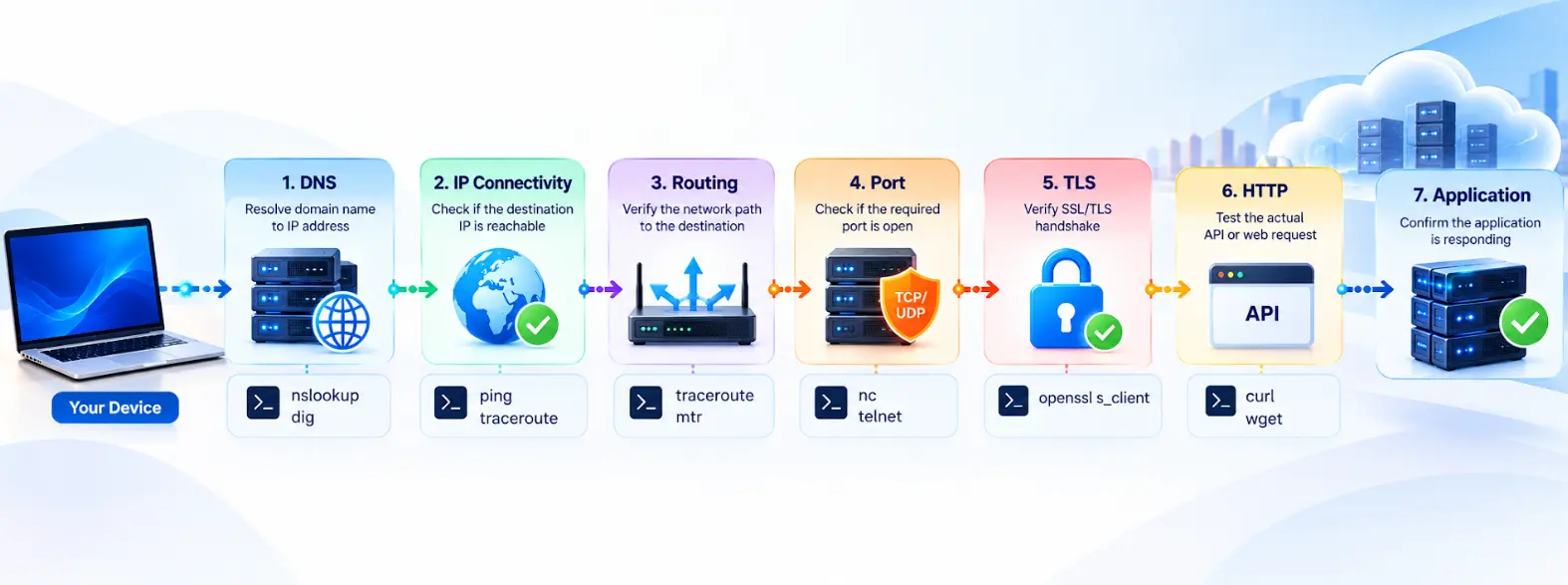
https://api.example.comInstead of immediately changing application code, follow the communication path and identify where it fails.
Start With DNS
Check whether the hostname resolves:
nslookup api.example.comor:
dig api.example.comIf DNS resolution fails, investigate the DNS configuration before looking for an application-level solution.
Check Connectivity
You can use:
ping <IP-address>However, a failed ping does not automatically mean that a server is unavailable. ICMP traffic may be blocked even when services using TCP or HTTPS are working.
Check the Port
For HTTPS, you can test TCP connectivity to port 443:
nc -vz api.example.com 443This helps determine whether the service can be reached at the transport layer.
Test the Application
Finally, try:
curl -I https://api.example.comThe troubleshooting process can therefore be viewed as:
DNS
 ↓
IP Connectivity
 ↓
Routing
 ↓
Port
 ↓
TLS
 ↓
HTTP
 ↓
Application
This structured approach helps you identify the actual failure instead of assuming every connectivity problem is caused by the application or firewall.
What Networking Skills Should IT Professionals Build
You do not need to learn every networking technology right away. A practical learning path starts with IP addresses MAC addresses, switches, routers, gateways and ports. Once you are comfortable with these move on to networking protocols DNS, DHCP, TCP, UDP, HTTP and HTTPS. After that learn subnetting, CIDR, routing, NAT and firewalls. With these fundamentals in place you can move toward networking, load balancers, VPNs, containers and Kubernetes networking.
The best way to keep these concepts is through experiments. Instead of simply memorizing what DNS does use nslookup or dig to check DNS information. Rather than memorizing that HTTPS usually uses port 443 test an HTTPS endpoint, with curl and see the response.
This approach turns networking from a subject into a practical troubleshooting skill. For IT professionals preparing for Cloud, DevOps, Kubernetes or infrastructure roles structured hands‑on learning can help connect these fundamentals with technology stacks. You can explore relevant resources on MicroDegree’s FREE E-Learning.
Common Networking Mistakes to Avoid
- Learning only definitions: Focus on understanding real-world networking problems rather than memorizing terms like DNS.
- Relying only on ping: A successful ping confirms ICMP reachability but does not guarantee that an application is working.
- Blaming every issue on firewalls: Connectivity problems can also arise from missing routes, incorrect DNS records, wrong ports, stopped services, or TLS misconfigurations.
- Ignoring application-layer issues: Understand how TCP, UDP, TLS, HTTP, and security controls affect application connectivity.
- Skipping systematic troubleshooting: Start with basic connectivity and gradually move toward the application layer to identify the root cause.
How to learn Networking Faster
- Learn through real requests. Pick something familiar, such as opening a website or calling an API, and identify what happens at each stage of communication.
- Practice with command-line tools. Tools such as ping, nslookup, dig, curl, ip, ss, and traceroute make networking concepts observable instead of purely theoretical.
- Take subnetting seriously. CIDR and subnetting appear frequently in cloud networking, VPNs, routing, and infrastructure configuration.
- Connect networking to your career path. Developers can focus heavily on HTTP, APIs, and database connectivity, while Cloud and DevOps professionals should go further into routing, subnets, load balancing, private networking, and security.
Conclusion
Networking basics are the starting point for every IT job today. You don't have to be an expert in networks. You should know how a request travels from one device to another. Begin with IP addresses, subnets, ports, DNS, TCP and UDP, routing and firewalls. Then link those ideas to the tools you already use.
The main aim of Networking From Zero: The Concepts Every IT Professional Must Know is not to remember terms. It is to build the skill to see a communication issue and figure out where the request failed and why. When that base is solid technologies like Cloud, DevOps, Kubernetes, containers and distributed systems become much simpler to grasp.
If you want to turn these networking basics into technology skills check out the Cloud, DevOps and infrastructure learning resources that are available, on MicroDegree’s FREE E-Learning.
FAQs
1. Can I learn networking if I am not from an IT background?▼
Yes. Networking can be learned progressively because the fundamental ideas are based on how devices communicate. Starting with IP addresses, DNS, ports, routers, and HTTP provides a manageable foundation before moving into more advanced topics.
2. How much networking knowledge is enough for a software developer?▼
A software developer should generally understand IP addresses, DNS, ports, TCP/UDP, HTTP/HTTPS, basic routing, and common connectivity problems. The required depth depends on the type of software being developed, with distributed systems and backend development often requiring deeper networking knowledge.
3. Is networking difficult to learn?▼
Networking can initially feel difficult because many concepts are interconnected. Once you understand how a request travels from a client to a server, however, concepts such as DNS, ports, routing, and protocols become easier to place within the overall picture.
4. Should I learn networking before starting cloud computing?▼
A basic understanding of networking is useful before learning cloud computing. Concepts such as IP addressing, subnets, routing, DNS, gateways, and firewalls appear throughout cloud platforms, so knowing them beforehand can reduce the learning curve.
5. Can I practice networking on my personal computer?▼
Yes. You can safely practice many fundamentals using built-in tools such as ipconfig, ip, ping, nslookup, dig, curl, ss, and traceroute. You can also create simple client-server programs on your own machine to understand how ports and network connections work.
6. What is a good way to know whether I actually understand networking?▼
Try explaining what happens when you enter a website address into a browser and then troubleshoot a deliberately created connectivity problem. If you can identify the roles of DNS, IP addressing, routing, ports, transport protocols, TLS, and HTTP without relying entirely on memorized definitions, your networking foundation is becoming practical.
Build Practical Networking and Cloud Skills
Networking is one of the foundations behind Cloud, DevOps, Kubernetes, Linux, infrastructure, and modern software applications.
If you are ready to move from networking theory to practical technology skills, explore the relevant courses and learning resources on MicroDegree.