
What Is AWS VPC and How Do You Design a Secure Cloud Network?
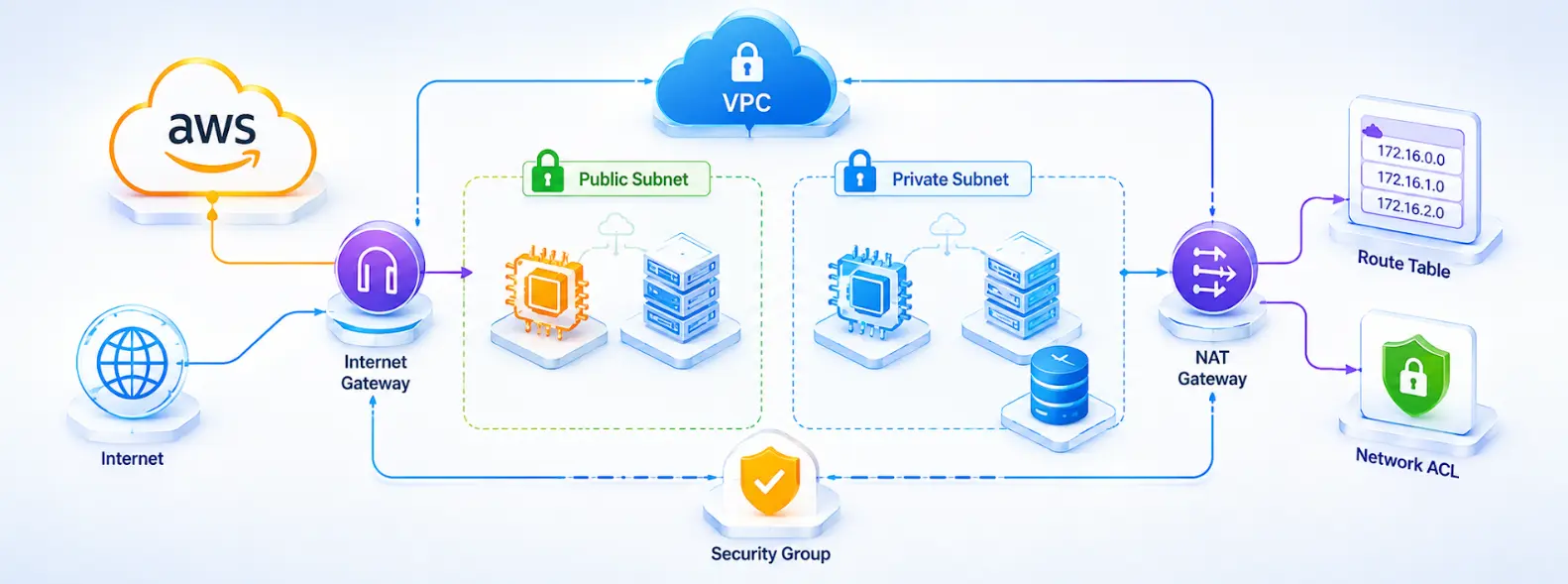
Think of an AWS VPC as your own private slice of the AWS network. You decide the IP range, you create the subnets, you set the routing, and you decide who's allowed to talk to what. It's your network, just running inside AWS instead of a physical data centre.
Every single thing you launch in AWS, an EC2 instance, an RDS database, a Lambda function with VPC access, sits inside one of these. Get the design right and it barely crosses your mind again. Get it wrong and you're usually looking at either a security incident or a surprise line item on your bill.
Here's what this guide actually covers: what a VPC is, how subnets and routing fit together, where security groups and NACLs differ, and the design calls that keep a network both secure and reasonably priced. By the end you'll know how to put together a VPC that holds up once it's actually running workloads, not just one that looks fine in a diagram.
ALSO READ: Which Google Cloud Certification Should You Choose? A Complete GCP Certification Guide
Table of Contents
▼What Is an AWS VPC and Why Does It Matter?
An AWS VPC is a logically isolated chunk of the AWS cloud where you launch resources inside a network you've defined yourself. You pick the IP range, build the subnets, wire up routing, and decide exactly what traffic gets in or out.
Every AWS account comes with a default VPC in each region already set up, using 172.31.0.0/16 with /20 subnets sitting in every Availability Zone. That's fine if you're just testing something quickly. Once you're running production workloads, though, you'll want a custom VPC built around what your app and your security team actually need.
Why VPC Design Matters
- It's the foundation everything else sits on, including IAM, security groups, and encryption
- A poorly segmented VPC makes it much easier for one compromised resource to reach everything else
- Fixing network mistakes later usually means downtime, since re-architecting a live VPC isn't a quick job
- Cloud, DevOps, and platform roles all treat VPC design as something you're just expected to know
How Is an AWS VPC Structured?
A VPC comes down to an IP address range, sliced into subnets, each one tied to a single Availability Zone, with route tables deciding where traffic is allowed to go from there.
Core Building Blocks
| Component | What It Does |
|---|---|
| CIDR block | The IP address range for the whole VPC, for example 10.0.0.0/16 |
| Subnet | A smaller IP range within the VPC, tied to one Availability Zone |
| Route table | Controls where traffic from a subnet is allowed to go |
| Internet Gateway | Lets resources in public subnets reach the internet directly |
| Availability Zone | A physically separate data centre within a region, used for redundancy |
You get up to 5 IPv4 CIDR blocks per VPC by default (AWS will extend that to 50 if you ask), each up to a /16, and up to 200 subnets. Each subnet you create maps to exactly one Availability Zone, so spread yours across at least two or three AZs if redundancy actually matters to you.
Public vs Private Subnets
| Subnet Type | Has a Route to Internet Gateway? | Typical Use |
|---|---|---|
| Public subnet | Yes | Load balancers, bastion hosts, NAT gateways |
| Private subnet | No (routes out through NAT instead) | Application servers, databases, internal services |
Here's the rule of thumb: if it holds sensitive data or doesn't need to be reachable straight from the internet, it doesn't belong in a public subnet. That goes double for databases. Keep them in private subnets and control access through security groups instead of exposing them publicly.
How Do You Design a Secure AWS VPC Architecture?
A secure VPC starts with isolating your subnets, then layering on strict traffic rules, then spreading things across multiple Availability Zones so one outage doesn't take everything down.
A Standard Three-Tier Pattern
- Public subnets hold only what genuinely needs internet access, like load balancers and NAT gateways.
- Private application subnets hold your app servers and internal services, reachable only from the tier above.
- Private data subnets hold your databases and caches, and nothing outside the app tier should ever reach them directly.
The point of this layering is simple. If your load balancer gets compromised, that shouldn't automatically hand someone a path to your database. Each tier only trusts the one directly above it, and you enforce that trust through security group rules rather than leaving everything wide open.
A Few More Things Worth Deciding Early
Give dev, staging, and production their own VPCs, or at least their own subnets and route tables, so a mistake in one doesn't bleed into another. Plan your CIDR ranges so they don't overlap across VPCs. Overlapping ranges quietly block VPC peering and Transit Gateway connections down the line, and renumbering a live VPC is not a fun afternoon. And turn on VPC Flow Logs from the start. You'll want that record the day something goes wrong, not after.
What's the Difference Between Security Groups and Network ACLs?
Security groups filter traffic at the resource level and remember your connections, which is what "stateful" means here. Network ACLs filter at the subnet level and forget everything between requests, so they're stateless. Most production setups use both, not one or the other.
| Factor | Security Groups | Network ACLs |
|---|---|---|
| Applies to | Individual resources (EC2, RDS, etc.) | Entire subnets |
| Stateful? | Yes, return traffic is automatically allowed | No, you must explicitly allow both directions |
| Rule types | Allow rules only | Allow and deny rules |
| Rule evaluation | All rules are evaluated together | Rules are evaluated in numbered order |
| Default limit | 60 inbound and 60 outbound rules per group | 20 rules per direction, adjustable |
You'll use security groups for most of your day-to-day work, since they attach directly to resources and their stateful behaviour means you write fewer rules overall. Think of network ACLs as your subnet-wide backstop instead, the thing you reach for when you need to block a known bad IP range across an entire subnet, no matter what security group sits on each individual resource.
How Do NAT Gateways and VPC Endpoints Actually Work?
A NAT gateway gets your private subnets out to the internet, outbound only. A VPC endpoint gets them to other AWS services privately, without ever touching the public internet. They solve different problems, and you'll usually need both.
| Factor | NAT Gateway | VPC Endpoint |
|---|---|---|
| Purpose | Outbound internet access for private subnets | Private access to AWS services |
| Traffic direction | Outbound only, no inbound connections allowed | Private, stays within the AWS network |
| Cost | Billed hourly plus per GB processed | Gateway endpoints (S3, DynamoDB) are free; interface endpoints have an hourly and per-GB charge |
| Best for | General internet access (package downloads, external APIs) | Talking to AWS services like S3 or DynamoDB from private subnets |
Here's a number worth knowing: in the Mumbai region, a NAT gateway runs you about ₹4.30 an hour, roughly ₹3,100 a month per gateway, plus another ₹4.30 or so per GB it processes. That data charge applies even when the traffic is just going to another AWS service in the same region. Which is exactly why sending your S3 or DynamoDB traffic through a free gateway VPC endpoint instead of a NAT gateway is one of the quickest wins if your AWS bill feels bloated.
AWS suggests one NAT gateway per Availability Zone for fault tolerance. In production, that extra cost is worth paying. For non-production environments where a brief outage won't hurt anyone, a single shared NAT gateway is a reasonable place to save some money.
What Are the Default AWS VPC Limits You Should Know?
AWS caps nearly every VPC resource with a default quota. Most of these you can raise yourself through a quota increase request, though a handful need an actual AWS Support case.
Common Default VPC Quotas
| Resource | Default Limit | Adjustable? |
|---|---|---|
| VPCs per Region | 5 | Yes |
| Subnets per VPC | 200 | Yes |
| IPv4 CIDR blocks per VPC | 5 (max /16 each) | Yes, up to 50 |
| Elastic IP addresses per Region | 5 | Yes |
| Security groups per VPC | 2,500 per account | Yes |
| Rules per security group | 60 inbound, 60 outbound | Yes |
| Route tables per VPC | 200 | Yes |
For most small deployments, you'll never bump into these. But if you're planning something bigger, a large multi-account or multi-environment setup, it's worth checking these numbers before you start, not after you hit one mid-project and have to redesign around it.
Conclusion
You don't need to memorise every setting to design a good AWS VPC. You just need a few habits: isolate your tiers, keep databases out of public subnets, use security groups and NACLs on purpose instead of by default, and send AWS-to-AWS traffic through endpoints instead of NAT gateways whenever you can.
FAQs
Q1: What is an AWS VPC in simple terms?▼
It's an isolated, private network inside AWS where you control the IP range, subnets, and routing for whatever you launch, basically your own network running inside a shared cloud environment.
Q2: What's the difference between a public and private subnet in AWS?▼
A public subnet has a route to an Internet Gateway, so you can reach it from the internet. A private subnet doesn't, so it can only get out through a NAT gateway, and nothing on the internet can reach in directly.
Q3: Do I need a NAT gateway for every VPC?▼
Only if something in your private subnets actually needs outbound internet access, like pulling software updates or calling an external API. If everything it needs to reach is another AWS service, a VPC endpoint is usually cheaper and safer.
Q4: What's the difference between a security group and a network ACL?▼
A security group is stateful and sits on individual resources, so it automatically allows return traffic. A network ACL is stateless and sits on a whole subnet, so you need explicit rules for both directions.
Q5: How many VPCs can I create in an AWS account?▼
Five per Region by default, though you can request a quota increase through the AWS Service Quotas console if you need more.
Q6: Is a VPC free to use on AWS?▼
The VPC itself, yes. What costs you money are the pieces inside it, things like NAT gateways, VPN connections, interface VPC endpoints, and data transfer.
Want to design AWS VPC architectures the way production teams actually build them, not the way tutorials show them? MicroDegree's AWS and Cloud Networking programs cover VPC design, security groups, and cost optimisation through hands-on, project-based labs. Explore the course that fits where you are right now.