
AWS Disaster Recovery Explained: RTO, RPO and the Right Strategy for Your Application
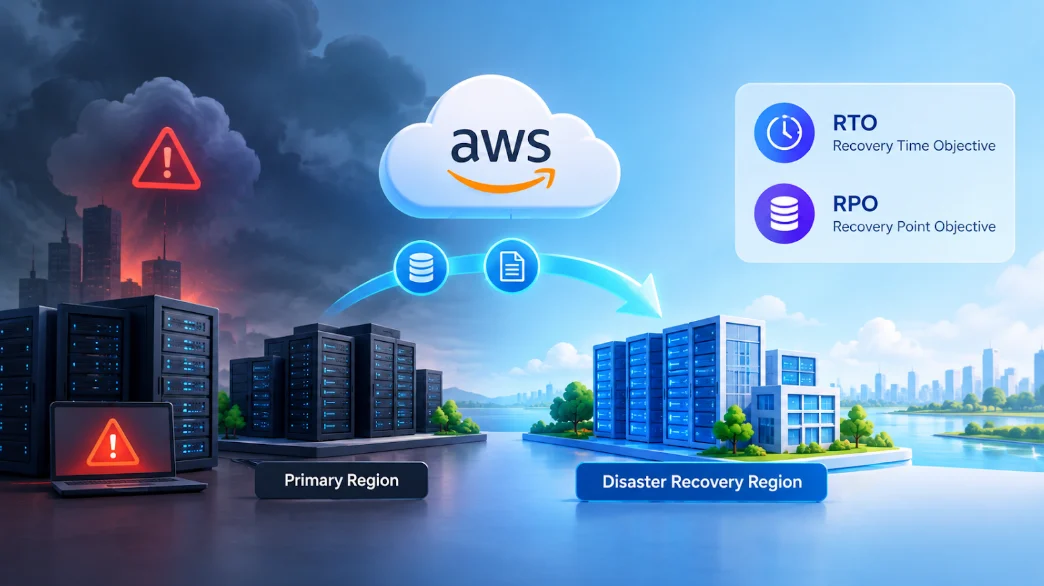
A single hour of downtime can cost a mid-sized e-commerce business tens of thousands of dollars. That's the problem AWS Disaster Recovery solves — using AWS services to bring your applications and data back after an outage, an attack, or someone accidentally deleting the wrong thing.
Every DR decision comes down to two numbers, RTO and RPO. This guide walks through what they mean, the four core AWS DR strategies, how to pick the right one, and the AWS services that actually make it work.
Table of Contents
▼What Is AWS Disaster Recovery?
AWS Disaster Recovery is the combination of architectures, services, and processes that help you get your applications and data back up after something goes wrong — a regional outage, a ransomware attack, an accidental deletion, or an infrastructure failure.
RTO vs RPO: The Two Numbers That Drive Your DR Plan
Before you can pick a DR strategy on AWS, you need two numbers on the table: RTO and RPO.
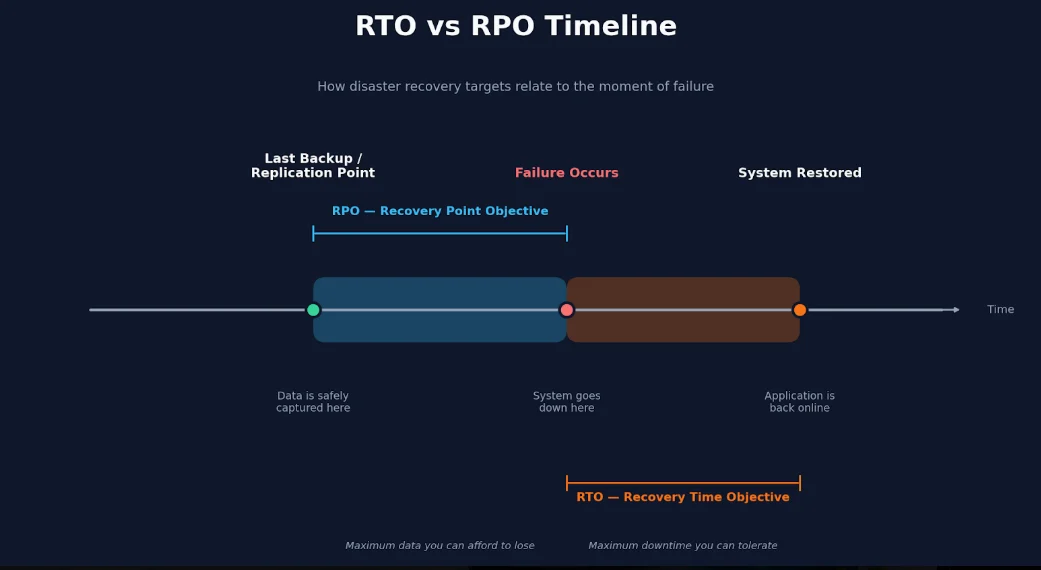
RTO (Recovery Time Objective) is how long your application can stay down before it has to come back up.
RPO (Recovery Point Objective) is how much data you can afford to lose — the gap between your last good backup or replication point and the moment things broke.
Think of an e-commerce checkout service with an RTO of 30 minutes and an RPO of 5 minutes. If it goes down, it needs to be back within half an hour. And whatever orders or transactions happened in the 5 minutes before the crash? Those might be gone.
That's the trade-off. Push RTO lower and you need infrastructure that's already running, or that can scale up almost instantly — which costs more. Push RPO lower and you need continuous replication instead of nightly backups, which also adds cost and complexity.
| Metric | Question It Answers | Example Target |
|---|---|---|
| RTO | How fast must we be back up? | 30 minutes |
| RPO | How much data can we afford to lose? | 5 minutes |
Get realistic RTO and RPO numbers agreed on with the business — not guessed by engineering alone — and the rest of this decision gets a lot easier.

The 4 Core AWS DR Strategies Explained
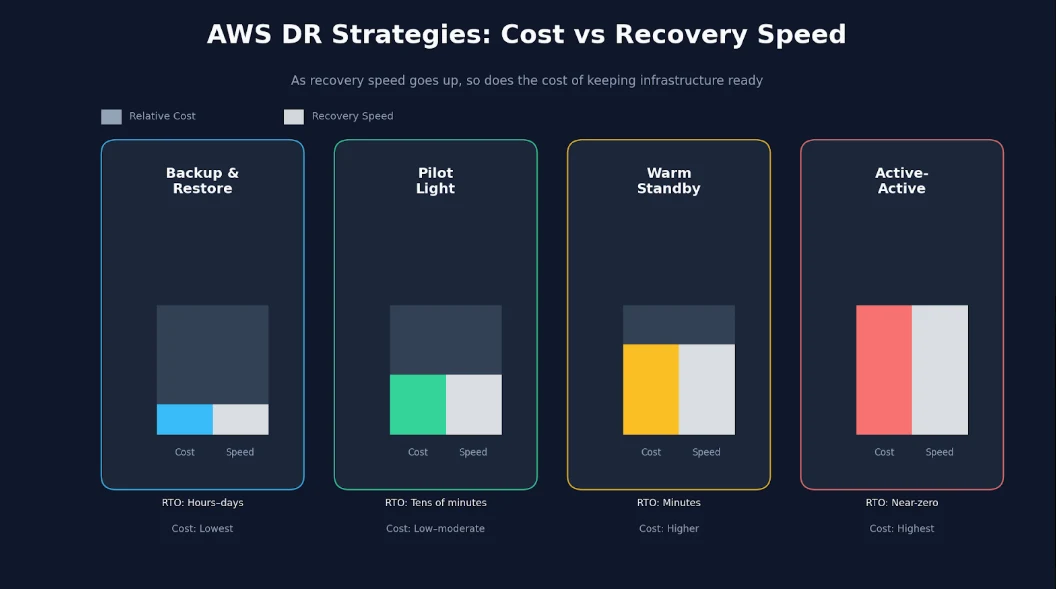
There are four standard patterns for disaster recovery on AWS, running from cheapest-and-slowest to most-expensive-and-near-instant.
Backup and Restore
The simplest option, and the cheapest. You take periodic backups of your data and configuration, park them in another Region or account, and rebuild your infrastructure from scratch if disaster actually hits.
- Typical RTO/RPO: Hours to days
- Cost: Lowest of the four
- Best for: Non-critical apps, dev/test environments, internal reporting tools, archives
Nothing runs in the DR Region until it's needed, so you're not paying for idle infrastructure — but rebuilding a full environment from backups takes time, even when most of it is automated.
Pilot Light
Your core data, usually the database, stays continuously replicated to a second Region. A small footprint of infrastructure sits there running at all times — enough to keep the pilot light lit — and you scale the application tier up around it once disaster hits.
- Typical RTO: Tens of minutes to about an hour
- Typical RPO: Minutes
- Best for: Important apps that can tolerate a short window of downtime but need fairly current data
It costs more than backup and restore, since something is always running, but it recovers a lot faster.
Warm Standby
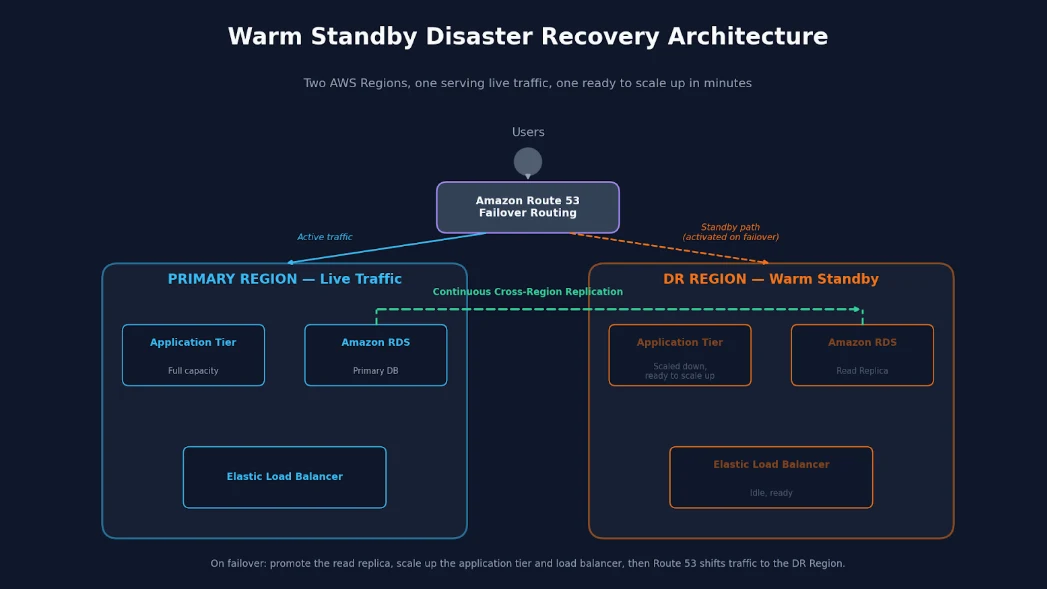
A scaled-down but fully working copy of your environment runs in the DR Region around the clock. When disaster hits, you promote the standby database, scale the app tier up to full capacity, and switch traffic over.
- Typical RTO: Minutes
- Typical RPO: Seconds to minutes
- Best for: Business-critical apps where extended downtime just isn't an option
Since a working copy is already live, failover mostly means scaling up and redirecting traffic — not rebuilding anything from zero.
Multi-Site Active-Active
The most expensive strategy, and the strongest. Full production runs simultaneously in multiple Regions, all serving live traffic at once. If one Region fails, traffic shifts to the healthy one and most users never even notice.
- Typical RTO/RPO: Near zero
- Best for: Mission-critical, revenue-generating systems where any downtime hurts
This does mean dealing with data consistency across Regions, which isn't trivial — it's generally reserved for cases where the cost of downtime clearly beats the cost of running duplicate production environments.
| Strategy | Typical RTO | Typical RPO | Relative Cost | Best-Fit Workload |
|---|---|---|---|---|
| Backup & Restore | Hours–days | Hours | Lowest | Non-critical, archives |
| Pilot Light | Tens of minutes | Minutes | Low–moderate | Important apps |
| Warm Standby | Minutes | Seconds–minutes | Higher | Business-critical |
| Active-Active | Seconds | Near-zero | Highest | Mission-critical |
How to Choose the Right DR Strategy for Your Application
Picking a DR strategy isn't about choosing the most impressive-sounding option. It's about matching the strategy to what the business actually needs and is willing to pay for. Here's a practical decision flow.
- Step 1: Classify the workload by business impact. Sort your applications into tiers — critical, important, standard, low priority. Not everything deserves the same level of protection, and treating a reporting dashboard like a payment system just wastes budget.
- Step 2: Define RTO and RPO with stakeholders, not just engineers. Sit down with whoever owns the application on the business side and agree on realistic numbers together. Engineering shouldn't set these targets alone — they're really about risk tolerance, and that's a business call.
- Step 3: Map RTO/RPO to a DR strategy. Use the comparison table above. Targets in "minutes" usually point to warm standby. Targets in "hours" mean backup and restore is probably enough.
- Step 4: Factor in budget, compliance, and operational maturity. A strategy that looks perfect on paper can fall apart if your team doesn't yet have the automation or the experience to run a multi-Region active-active setup reliably.
A few examples make this concrete:
- An internal reporting dashboard that a handful of employees check → hours of downtime is fine → Backup and Restore.
- A customer-facing API with a 15-minute RTO requirement → needs something already partially running → Warm Standby.
- A payment processing system where every minute down costs money and trust → Active-Active, or at minimum a very strong Warm Standby.
Most organizations don't settle on one DR strategy for everything. They mix and match — active-active or warm standby for the systems that matter most, backup and restore for everything else. That keeps DR spending roughly proportional to actual risk.
AWS Backup and Services That Power Disaster Recovery
AWS Backup usually sits at the center of a disaster recovery plan. It gives you centralized backup management, policy-based scheduling, and the ability to copy backups across Regions and accounts from one console, instead of juggling backup settings service by service.
Beyond AWS Backup itself, several services work together to make disaster recovery on AWS practical:
- AWS Elastic Disaster Recovery (AWS DRS): Continuously replicates entire servers to AWS, enabling very low RTO for pilot light and warm standby setups. AWS DRS now supports Recovery Plans, which automate the sequential launch of multi-server applications during failover and drills.
- Amazon S3 Cross-Region Replication: Automatically copies objects to a bucket in another Region, protecting object storage data with a low RPO.
- RDS Multi-AZ, Read Replicas, and Aurora Global Database: Keep database copies synchronized across zones or Regions, supporting fast promotion during failover.
- DynamoDB Global Tables: Replicate NoSQL data across multiple Regions with minimal lag, supporting near-zero RPO for active-active designs.
- Route 53 Failover Routing: Automatically redirects traffic away from an unhealthy Region toward a healthy one, which is essential for reducing RTO.
- CloudFormation or Terraform: Let you rebuild infrastructure in a new Region quickly and consistently through infrastructure as code, rather than manual rebuilding.
Each of these services maps directly back to your RTO and RPO targets. AWS DRS and database replication tools push your RTO down. Cross-Region replication and continuous backups push your RPO down. The right combination depends entirely on the DR strategy you chose in the previous section.
If you're prepping for a cloud role and want to see how these same services — S3, RDS, DynamoDB, Route 53 — come up in real technical interviews, our AWS services cloud engineer interview guide breaks down exactly what interviewers ask and how to answer with confidence.
Real-World DR Patterns for Common Workloads
Seeing these pieces combined in practice makes them easier to apply. Three common patterns:
- Web application backed by RDS: A warm standby environment sits in a second Region with a scaled-down app tier. The RDS instance runs a cross-Region read replica. When failover happens, that replica gets promoted to primary, the app tier scales up, and Route 53 failover routing sends traffic to the DR Region.
- Microservices running on Amazon EKS: The primary cluster lives in one Region; a minimal standby cluster sits in a second. Deployments run through GitOps, so pushing the full application stack to the standby cluster is quick and repeatable. AWS DRS handles replication for stateful components that don't fit a Kubernetes-native replication approach.
- Data lake on Amazon S3: Cross-Region replication keeps a live copy of the data lake elsewhere. AWS Backup vaults hold periodic snapshots for compliance and long-term retention. And restore testing, done regularly, confirms the data lake can actually come back — not just that it was backed up.
None of these patterns lean on a single AWS service. Real disaster recovery is almost always several services working in concert to hit one RTO and RPO target.
Career and Business Impact of Strong DR
Disaster recovery is one of the more valuable skills an IT professional can pick up. Engineers who can explain RTO and RPO and lead a real failover stand out — and cloud roles are evolving fast too, so it helps to know what AWS agentic engineering is and why it's an emerging cloud role.
On the business side, strong DR lowers risk, supports compliance, and protects revenue and customer trust when outages hit. It isn't insurance you hope never to use — it's a real competitive edge.
Conclusion
It really comes down to one idea: match your RTO and RPO to the simplest strategy that meets them. Know your workload's criticality, agree on RTO/RPO with the business, and choose between backup and restore, pilot light, warm standby, or active-active from there.
Get comfortable with these patterns, and designing resilient systems on AWS stops feeling intimidating. If you want a clear, structured path for building these skills — from core AWS fundamentals up through architecture and DR — check out our Cloud Certification Roadmap 2026.
FAQs on AWS Disaster Recovery
Q1: What is AWS Disaster Recovery?▼
It's the set of architectures and processes that help you restore applications and data after a major failure, using services like AWS Backup, AWS Elastic Disaster Recovery, and multi-Region designs to hit your RTO and RPO targets.
Q2: What is the difference between RTO and RPO?▼
RTO is how long your application can stay down before it must come back. RPO is how much data loss you can tolerate — the time gap between your last backup or replication point and the failure.
Q3: Which AWS DR strategy is the most cost-effective?▼
Backup and restore, hands down — though it comes with a higher RTO and RPO. It works fine for non-critical workloads where a few hours of downtime and some data loss won't hurt much.
Q4: How do I choose the right DR strategy for my application?▼
Classify the workload by business impact first, and agree on RTO and RPO with stakeholders. Then map those numbers to a pattern — backup and restore, pilot light, warm standby, or active-active.
Q5: Which AWS DR strategy best fits mission-critical applications?▼
Mission-critical apps usually need RTO and RPO in seconds to a few minutes, which rules out periodic backups and points to warm standby or active-active. Active-active runs full production across multiple Regions at once; a strong warm standby keeps a scaled-down environment live and ready to promote at a moment's notice.
Start by writing down the RTO and RPO for one critical workload this week — that alone clarifies a lot. Want hands-on practice first? MicroDegree's AWS, Cloud, and DevOps courses walk through these DR patterns with real labs. Got a DR question or a setup you're stuck on? Drop it in the comments.