
How to Switch from React Developer to Cloud Engineer

When one of your React apps broke in production, the cause was rarely in the components. It was a CORS header, a stale CDN cache, an expired certificate, or a build that passed on your laptop and failed in the pipeline.
Moving from React developer to cloud engineer mostly means learning the operations side, and you can start from an app you already have. The sections below cover what carries over, what to learn in order, a first AWS project, a 5-month plan and the salary data.
Table of Contents
▼Can a React Developer Become a Cloud Engineer?
Yes. You already write code, use Git, read build logs and work with APIs. What changes is the thing you look after. A React developer ships screens. A cloud engineer ships and runs what those screens depend on: networks, servers or containers, access rules, pipelines and monitoring.
You also give something up. Much of the day moves from components and CSS to terminals, configuration files and dashboards. If that sounds dull, spend a weekend on the project below before you commit to a plan.

Skills You Already Have as a React Developer
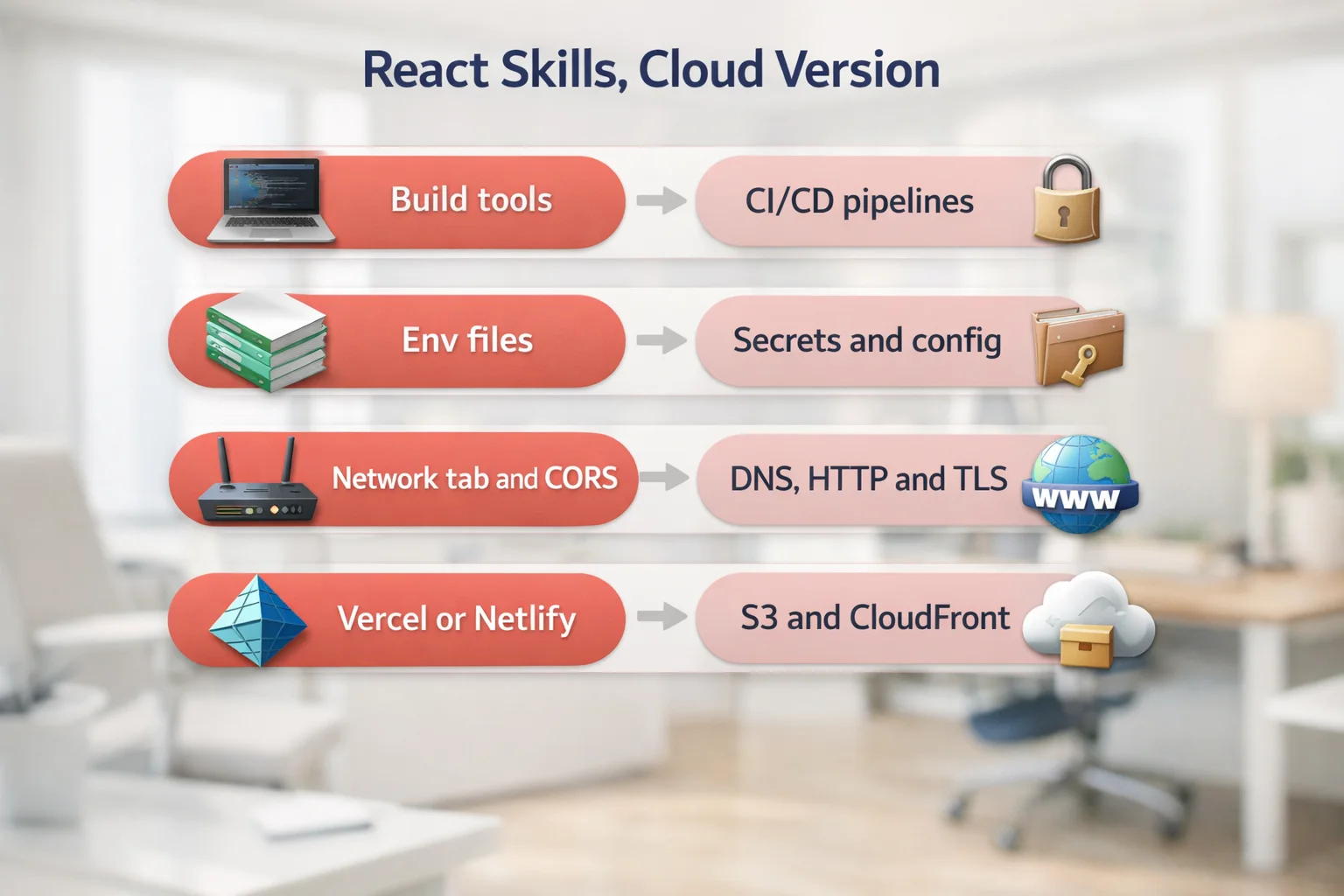
Several things you do every week have a cloud counterpart. Knowing them helps in interviews and shows where to start.
| What you do as a React developer | The cloud counterpart |
|---|---|
| npm scripts and build tools such as Vite or webpack | CI/CD pipelines that build, test and deploy the code |
| .env files and environment variables | Secrets and configuration management, such as AWS Secrets Manager and Parameter Store |
| Reading the browser network tab and fixing CORS errors | Troubleshooting HTTP, DNS, TLS and load balancers |
| Deploying to Vercel or Netlify | Hosting on S3 and CloudFront with your own domain and certificate |
| Bundle size, cache headers and Lighthouse scores | CDN caching, compression and performance monitoring |
| Pull requests and code review | Reviewing infrastructure changes written as code |
What You Still Need to Learn
The gaps are mostly on the operations side. Learn them in this order, because each step makes the next one easier.
- Linux and the command line: files, permissions, processes, services and logs. Our guide to Linux for cloud covers the basics.
- Networking: IP addresses, DNS, TCP and HTTP, TLS and ports. In AWS this becomes the VPC, subnets, route tables and security groups.
- One cloud platform. AWS is the usual first choice. Start with EC2, S3, IAM, VPC, CloudFront and Route 53, and see our list of 25 AWS services to know before an interview.
- Identity and access: IAM users, roles and least privilege. Get this right early, because every other service depends on it.
- CI/CD with GitHub Actions or a similar tool, so deploys run from a pipeline and not from your laptop.
- Docker first, then a container service such as ECS. Kubernetes can wait until the rest feels comfortable.
- Infrastructure as code with Terraform, so servers and networks are created from files you can review. See the Terraform roadmap for cloud and DevOps engineers.
- Monitoring and alerts with CloudWatch, which is where your debugging habits from front-end work pay off.
Build This First: Host Your React App on AWS
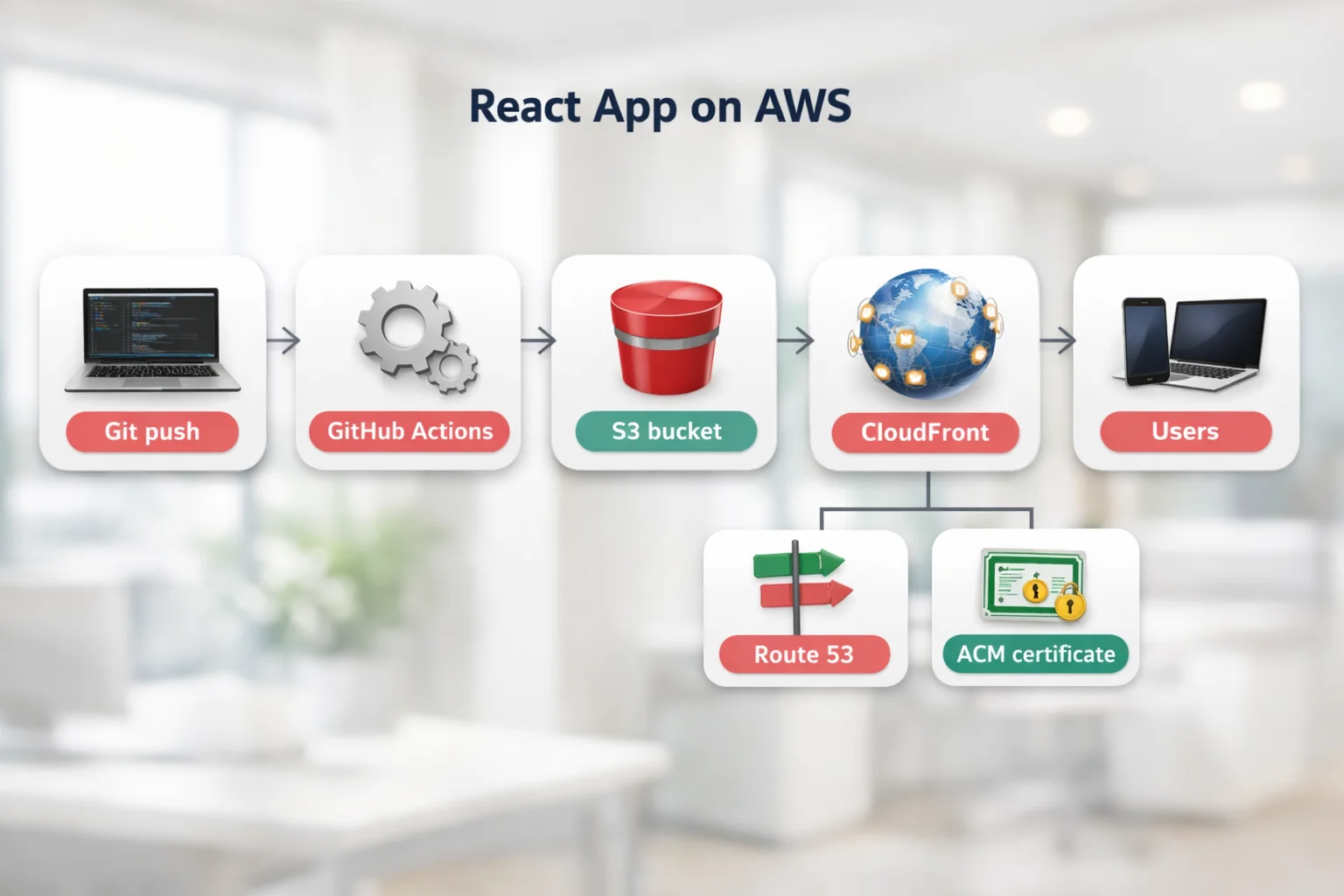
A good first project uses what you already know. Take a React app you have built and host it yourself, instead of on Vercel or Netlify. The steps below teach storage, a CDN, certificates, DNS and access control in one small project.
- Build the app with
npm run build. The output folder isdistin Vite andbuildin Create React App. - Upload the files to a private S3 bucket.
- Put CloudFront in front of the bucket and use origin access control, so the bucket is not public and only CloudFront can read it.
- Request a certificate in AWS Certificate Manager. For CloudFront it has to be created in the us-east-1 region. Then point your domain at the distribution with Route 53.
- Add a custom error response that returns
index.htmlwith a 200 status for 403 and 404 errors. Without it, refreshing a client-side route such as /dashboard shows an error page, because that file does not exist in the bucket.
Once the manual version works, deploy it from a script. These three commands do the deploy:
npm run build
aws s3 sync dist/ s3://your-bucket-name --delete
aws cloudfront create-invalidation --distribution-id YOUR_DISTRIBUTION_ID --paths "/*"
Then move those commands into a GitHub Actions workflow. Let the workflow assume an IAM role through OpenID Connect, so you do not store long-lived AWS access keys in the repository. Finally, rewrite the bucket, the distribution and the DNS records in Terraform, so the whole setup can be rebuilt from code.
A 5-Month Plan While Working
This plan assumes 8 to 10 hours a week. Treat the timings as a guide. If you already know Linux, you can move faster.
| Month | Focus | What you should have by the end |
|---|---|---|
| 1 | Linux, networking basics and Git | Comfort in the terminal, and a clear picture of how a request travels from browser to server |
| 2 | AWS core services and IAM | Your React app hosted on S3 and CloudFront with a domain and certificate |
| 3 | CI/CD and Docker | A GitHub Actions pipeline that deploys on every merge, and the same app running in a container |
| 4 | Terraform and monitoring | The hosting setup defined in Terraform, with CloudWatch alarms that email you |
| 5 | Portfolio, certification and applications | A written project summary, an entry-level AWS certification if you choose one, and a CV that shows results |
If you want a tighter schedule, our 90-day cloud and DevOps learning plan for working professionals fits more into less time. The cloud certification roadmap for 2026 explains which certificate to take first. If you would rather follow a guided path alongside your job, MicroDegree's learning programs are one option.
React Developer vs Cloud Engineer Pay in Bangalore
Check what the numbers say before you switch. The table below uses one source for both roles, so the comparison is like for like: Flexiple's published salary pages for React developers and cloud engineers in Bengaluru, which I read in October 2026. The figures are self-reported annual pay (CTC) in lakh rupees a year (LPA).
| Experience | React developer (median) | Cloud engineer (median) |
|---|---|---|
| 0 to 3 years | ₹4.8 LPA | ₹5.3 LPA |
| 3 to 6 years | ₹9.9 LPA | ₹7.8 LPA |
| 6+ years | ₹23.2 LPA | ₹16.6 LPA |
| Bengaluru, all levels | ₹10.6 LPA | ₹9.8 LPA |
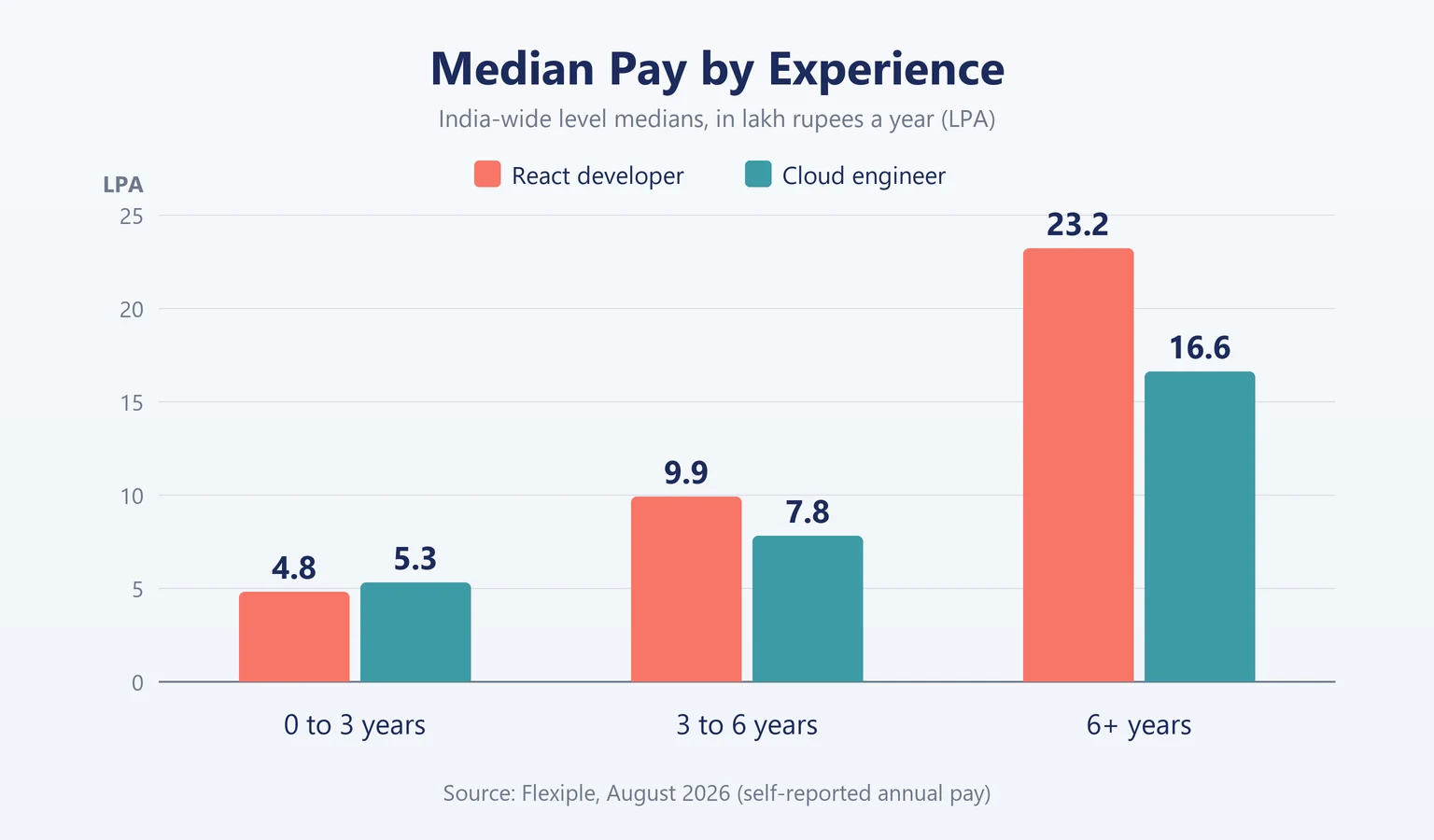
Read the table with three cautions. First, the three experience rows are India-wide medians, and Flexiple says it does not re-cut them to Bengaluru. Only the last row is specific to Bengaluru. Second, the sample sizes are very different. The Bengaluru all-levels figure for React developers comes from 28,350 records and the one for cloud engineers from 632, so the cloud numbers are less certain. Third, the middle 50% of Bengaluru pay runs from ₹4.8 LPA to ₹22.2 LPA for React developers and from ₹6.4 LPA to ₹17.5 LPA for cloud engineers, which is a wide spread.
Flexiple's own FAQ section gives different level medians from its tables for both roles, so even one source is not fully consistent. A second source for React developers, PayScale, lists an average base salary of ₹588,348 a year across 216 profiles in India, updated in June 2026. Its average total pay for 1 to 4 years of experience is ₹551,730 from 175 salaries. That is in the same range as Flexiple's entry-level React figure, though each source defines its groups differently.
In this data, switching is not a clear pay jump. At 0 to 3 years the cloud median is slightly higher, and from 3 years upward the React median is higher. Pay is one factor among several. A better reason to switch is that you like infrastructure work and want the paths it opens, such as DevOps, site reliability and platform engineering. These numbers are estimates and will differ by company, skills and certifications. For more on cloud pay, including product and services companies, see our cloud engineer salary guide for India and cloud engineer pay in product and service companies.
Show Proof Before You Apply
Two or three small projects you can explain are worth more than a long list of tools on a CV. Build these in order:
- The React hosting setup above, with the pipeline and the Terraform code in a public Git repository.
- A containerised API running behind a load balancer with HTTPS, using Docker and ECS or a small EC2 setup.
- Monitoring for your own project: a dashboard and an alarm. Then break the app on purpose and write up how you found the cause. This is the same skill you use when debugging a front-end bug.
For more ideas, read our list of AWS projects for a resume. When you describe a project, state the problem, what you built and what changed as a result.
Common Mistakes to Avoid
- Starting with Kubernetes. Linux, networking and one cloud platform come first.
- Watching videos without building anything. You learn the services by running them.
- Making the S3 bucket public so the site loads. Use CloudFront with origin access control instead.
- Storing AWS access keys in a repository. Use roles and short-lived credentials.
- Leaving resources running and getting a bill. Set a budget alert on day one and delete what you no longer use.
- Hiding your React background. It is an advantage: you know what the front end needs from the platform.
Conclusion
Moving from React developer to cloud engineer is a realistic plan if you build on what you know. Host one of your own apps properly, automate its deploys, define it in code, and add monitoring. The pay data shows similar ranges, so do not expect an automatic raise. If the infrastructure side of your work is the part you enjoy, start this week with one hour on Linux. Our guide on how to switch to cloud computing without quitting your job covers the rest of the transition.
FAQs
1. Can a React developer become a cloud engineer without a DevOps background?▼
Yes. Software developers do move into cloud roles. You need Linux, networking, one cloud platform, CI/CD and infrastructure as code, and you can learn them in that order while working.
2. How long does it take to move from React developer to cloud engineer?▼
A working developer can plan for about five months of steady practice before applying, and some will need longer. It depends on how much Linux and networking you already know and how many hours you can study each week.
3. Do I need to give up React to become a cloud engineer?▼
No. Your front-end knowledge stays useful, for example when you host single-page apps, set up caching or debug a failed deploy. Some engineers keep a front-end role and take on the deployment work first.
4. Should I learn AWS or Azure first?▼
Either works. Choose one based on the jobs you want and go deep before adding a second. AWS is a common first choice, and the hosting project in this guide uses it.
5. Does a cloud engineer earn more than a React developer?▼
Not automatically. In the Flexiple data used above, the cloud median is slightly higher at 0 to 3 years and the React median is higher from 3 years upward. Pay varies by company, skills and city, so check current listings for your own level.
6. Do I need an AWS certification to get a cloud job?▼
It is not strictly required. An entry-level certification can help a CV get shortlisted, but a working project you can explain clearly usually counts for more in an interview.
Curious what the cloud side looks like?Click here to take a free demo