
Will AI Replace IT Support Engineers? Tasks at Risk and Skills to Build
Will AI replace IT support engineers? Not the whole job, going by the evidence so far, but it is taking over a growing share of the routine work: password resets, ticket sorting and answers to questions that already have a documented fix. The US Bureau of Labor Statistics (BLS) projects employment of computer support specialists to fall 3% between 2025 and 2035, because organisations keep adopting automated tools such as chatbots for troubleshooting. A 3% fall is not a collapse, but it does mean fewer people answering the same questions.
The practical version of the question is whether AI will replace IT support in your team, or only some of what you do each day. Below: what the evidence says, which support tasks are most at risk, the skills worth building, what support and cloud roles pay in India, and a plan you can run alongside your queue. Where something is my judgement rather than a sourced finding, I say so.
Table of Contents
▼What the Evidence Says So Far
Start with the one official projection that names your job. The BLS Occupational Outlook Handbook expects employment of computer support specialists, which includes help-desk technicians (750,600 jobs in 2025), to decline 3% from 2025 to 2035. Its stated reason is that organisations continue to implement automated tools, such as chatbots, for troubleshooting. It adds that automation may let some specialists handle more complex cases, but that fewer are expected to be needed overall. These are US numbers, and I found no equivalent official projection for India.
Company surveys point the same way, less sharply. A Gartner survey of 321 customer service leaders in October 2025 found only about 20% had reduced agent headcount because of AI; most said staffing was stable while volumes grew. Gartner also predicts that by 2027, half of the companies that cut customer service staff because of AI will rehire people for similar work under different job titles. That is customer service, not IT support, and I could only read summaries of Gartner's releases, so take it as a signal about how AI-driven cuts are going, not as IT data.
The pressure is uneven. In a study of 5,179 customer support agents given a generative AI assistant, issues resolved per hour rose about 14% on average, and by 34% for novice and low-skilled agents, with little change for experienced ones (NBER, later published in the Quarterly Journal of Economics). Separately, a Stanford Digital Economy Lab paper using US payroll data through June 2026 finds employment of workers aged 22 to 25 in AI-exposed occupations 19% below where it would be at the pace of less-exposed jobs, mostly through less hiring. The authors call this early and descriptive, not causal.
My reading of the two together: the entry-level rung is where the squeeze shows first, because it holds the work AI copies best. The sources agree on direction and disagree on speed. BLS shows a slow decline, Gartner shows some AI-driven cutting being walked back, and nobody can say how Indian service desks will fare. Planning for fewer entry-level seats is realistic. Nothing I read supports planning for the job to vanish.

Follow One Ticket: Where AI Steps In and Where You Still Do
Take a ticket most support engineers have seen: a user says the VPN connects on office Wi-Fi but fails from home. Here is how it moves. The notes on what AI can do are my assessment of how current tools are used, not a measured result.
- Intake. The user describes the problem in a chat window. A chatbot can ask for the device, the operating system and the exact error, then match the answer to a knowledge-base article. If the cause is known, it may close the ticket without you.
- Triage. AI can categorise the ticket, set a priority from keywords and summarise a long email thread. You catch what the keywords miss, such as a ticket marked low priority that comes from someone presenting to a client in an hour.
- Known fix. A tool can suggest the usual steps: update the client, clear the saved credentials, check the profile. You decide whether a fix is safe to apply, because some of them change security settings.
- Diagnosis. When the standard fix fails, a person reads the client logs, notices that only users on one internet provider are affected, and tests from their own connection. AI can propose hypotheses from the logs. You verify them, because a suggestion can be wrong and still sound sure of itself.
- Change and escalation. The cause turns out to be a gateway setting. Someone has to get approval, make the change or hand it to the network team with an escalation note that has the evidence in it.
- Follow-up. The knowledge-base article gets updated so that next time the chatbot can solve it. AI can draft the text. You check it, because a wrong article means the bot gives the wrong answer to everyone.
Steps one to three are where AI is strongest, and they are also where entry-level work has traditionally lived. Steps four to six are where context, access and accountability matter. Step six is easy to overlook: whoever keeps the knowledge base accurate decides how good the chatbot is.
Support Tasks by Risk
This table is my judgement, not a ranking from a study. Here, "exposure" means how much of the task a tool can already do from start to finish.
| Task | Exposure | Why | What to do about it |
|---|---|---|---|
| Password resets and account unlocks | High | Microsoft documents self-service password reset that works "with no administrator or help desk involvement" | Own the rollout and the exceptions: users who never registered, lost phones, locked admin accounts |
| Sorting, routing and summarising tickets | High | It is pattern-matching on text | Review the routing rules, fix mislabelled categories and report the trends |
| Repeat "how do I" questions | High | The answers already exist in writing | Write and maintain the articles the chatbot draws from |
| Standard installs and access requests | Medium | Workflows can run them, but approvals and exceptions still need a person | Learn the workflow tools and handle the exceptions |
| Faults that span several systems | Lower | They need context, access and testing | Build depth in operating systems, networking and cloud |
| Incident updates and escalation | Lower | People have to trust the message and someone has to be accountable for it | Practise short, accurate updates and clear handovers |
| Hands-on hardware work | Lower | The work is physical | Keep it as one skill among several, not the whole job |
The Microsoft Entra documentation describes how self-service password reset works. The same page shows where people stay involved: users who have not registered an authentication method are told to contact their administrator.
Skills to Build, in the Order I Would Learn Them
- A diagnosis method. Form a hypothesis, test one thing at a time and write down what you ruled out. This is what lets you judge an AI suggestion instead of trusting it.
- Operating system and networking depth. Windows and Linux basics, DNS, DHCP, TCP/IP and VPNs. Practise by breaking things in a virtual machine on your own computer and fixing them from the logs.
- Identity and access. Single sign-on, multi-factor authentication and role-based access. This is where password resets are heading, and someone has to run it.
- Scripting. PowerShell or Bash for the tasks you repeat. Read every script an AI tool gives you before you run it.
- Cloud fundamentals. Pick AWS or Azure and learn its identity, virtual machine and monitoring basics. The service desk to cloud engineer guide and the DevOps roadmap for application support engineers show routes from the queue.
- Writing. Escalation notes, status updates and short postmortems. They improve the knowledge base and show that you can own an incident.
- Checking AI output. Treat a suggestion as a hypothesis. Verify it, and never paste credentials or customer data into a tool your company has not approved.
You do not have to learn all seven at once, and no single tool or certificate makes a job secure. Pick two that fit what your queue already shows you. If you want structured courses for the cloud part, MicroDegree's learning platform is one option to look at.
What Support and Cloud Roles Pay in India
Pay is part of the question, so here is what one salary site shows for India as a whole. The figures are Flexiple's self-reported annual CTC data, read in November 2026 (both pages updated August 2026). They are estimates that vary by company, skills and city. Flexiple was the only source I could read for both roles, so there is no second site to compare it against.
| Experience | Technical support engineer (median) | Cloud engineer (median, middle 50% in brackets) |
|---|---|---|
| All levels | ₹6 LPA (₹4L to ₹10.6L) | ₹7.7 LPA (₹4.9L to ₹13L) |
| 0 to 3 years | ₹4.2 LPA | ₹5.3 LPA (₹4L to ₹7.9L) |
| 3 to 6 years | ₹6 LPA | ₹7.8 LPA (₹5.2L to ₹11.7L) |
| 6+ years | ₹10.7 LPA | ₹16.6 LPA (₹9.7L to ₹25.8L) |
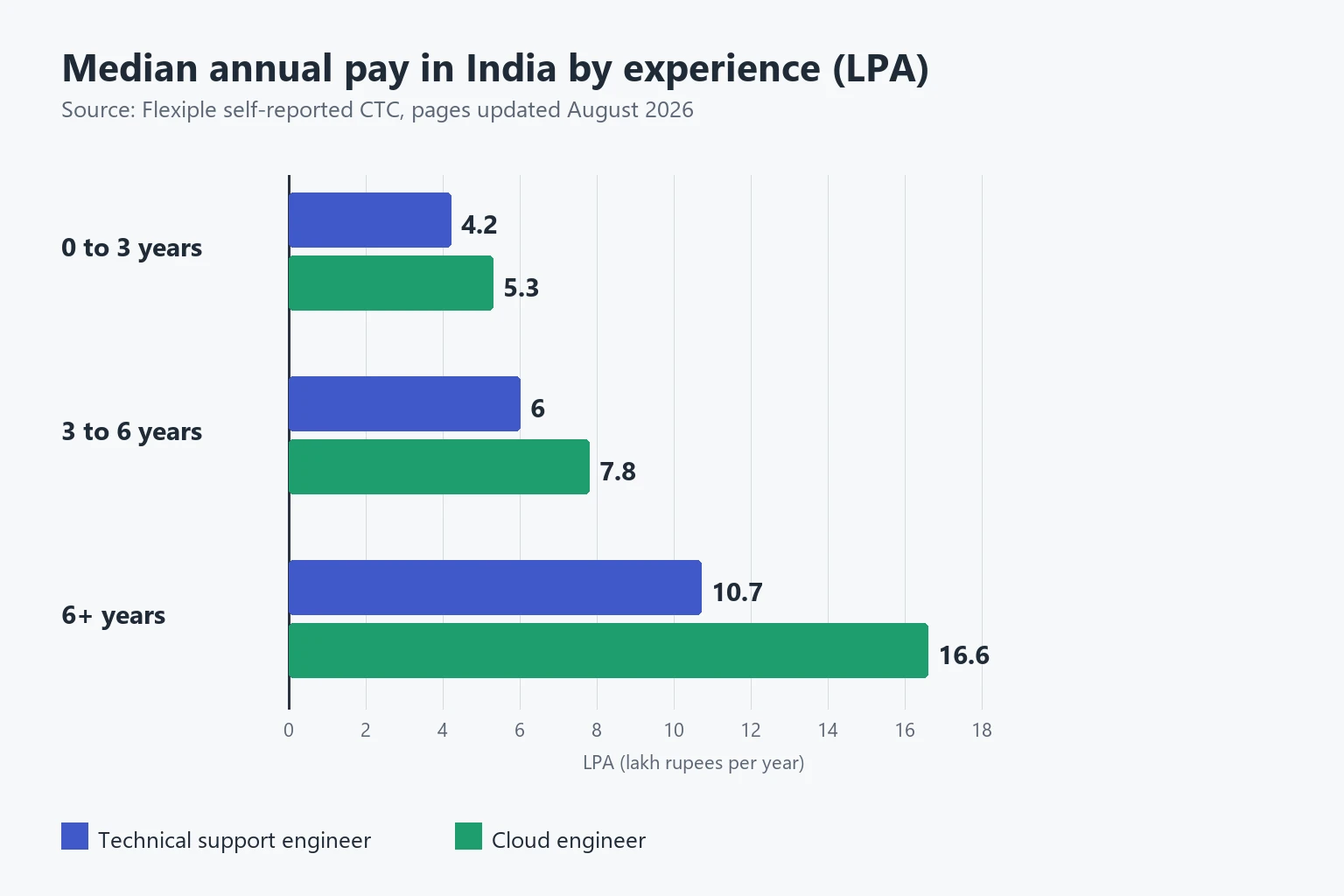
Read the gap with care. In this dataset the cloud engineer median is higher at every band, and the difference grows with experience. That does not mean a move from support will raise your pay by that much. The data is self-reported, job titles mean different things in different companies, and the figures say nothing about the skills behind each title. The Bengaluru figures are in the service desk to cloud engineer guide.
A Six-Week Plan You Can Run Alongside Your Queue
- Week 1. For five working days, note the type of every ticket you close. Mark the ones a chatbot could have answered from an article.
- Week 2. Take your three most frequent ticket types. Write or fix the knowledge-base article for each, then see over the following weeks whether those tickets come in less often.
- Weeks 3 and 4. Set up a Linux and a Windows virtual machine on your own computer. Break DNS, a service and a firewall rule on purpose, and fix each from the logs. Keep notes.
- Week 5. Script one task you repeat, in PowerShell or Bash. Test it on a non-production account and comment it so a colleague can read it.
- Week 6. Create a small virtual machine on AWS or Azure and connect to it securely. Check the provider's current pricing and delete everything afterwards. Then write one page on what you built and what you learnt, for your manager or your resume.
If Your Employer Is Rolling Out an AI Assistant Now
- Ask to join the pilot. The people who see what the tool gets wrong in its first month are best placed to shape it.
- Keep a list of its mistakes, with the ticket and the right answer. It is evidence for the team and practice for you.
- Ask how success is measured. A ticket the chatbot closed is not always a ticket that was solved, and the difference shows up as repeat contacts.
- Read the data-handling rules for the tool before you paste anything into it.
Conclusion
Will AI replace IT support? The evidence says it is shrinking the routine part of the work and probably the number of entry-level seats, not erasing the job. The tasks at risk are password resets, ticket sorting and repeat questions. The tasks that look more durable are diagnosis, access, escalation and writing things down so others can act on them. Pick two skills from the list, build one small project this month and keep notes on what AI got wrong in your own queue.
Continue Learning with MicroDegree
Moving from answering tickets to running the systems behind them takes fundamentals and practice. Explore MicroDegree's e-learning platform to look at courses across cloud, DevOps and AI together, and start with the skill that matches the work your queue shows you every day.
FAQs
1. Will AI replace IT support engineers completely?▼
Nothing I read says so. BLS projects a 3% decline in US computer support specialist jobs from 2025 to 2035, and says automation may leave people to handle more complex cases. Routine work and entry-level hiring are the most exposed parts.
2. Which IT support tasks are most at risk from AI?▼
Password resets, ticket sorting and summaries, and repeat questions with documented answers. Fault diagnosis across systems, access decisions and incident communication are less exposed. The risk ratings in this post are my judgement, not a study's ranking.
3. Is a help desk job still a good way to start in IT?▼
It can be, but expect fewer entry-level seats and more weight on learning beyond the queue. BLS still expects about 48,700 openings a year across computer support specialists in the US, all from workers leaving the occupation. Use the role to learn systems, networking and identity, and to build a project beyond tickets.
4. What should an IT support engineer learn to stay employable?▼
A diagnosis method, operating system and networking depth, identity and access, some scripting and cloud fundamentals. Add clear writing and the habit of checking AI output. Pick two to start, not all of them.
5. Should I move from support to cloud or DevOps?▼
Cloud roles paid more in the Flexiple data at every experience band, but that is self-reported pay and not a promise. It depends on what you enjoy. The [comparison of cloud, DevOps and GenAI for IT support](/blog/cloud-vs-devops-vs-genai-for-it-support) can help you choose.