
How Scrum Masters Can Use Generative AI in Agile Project Management in 2026

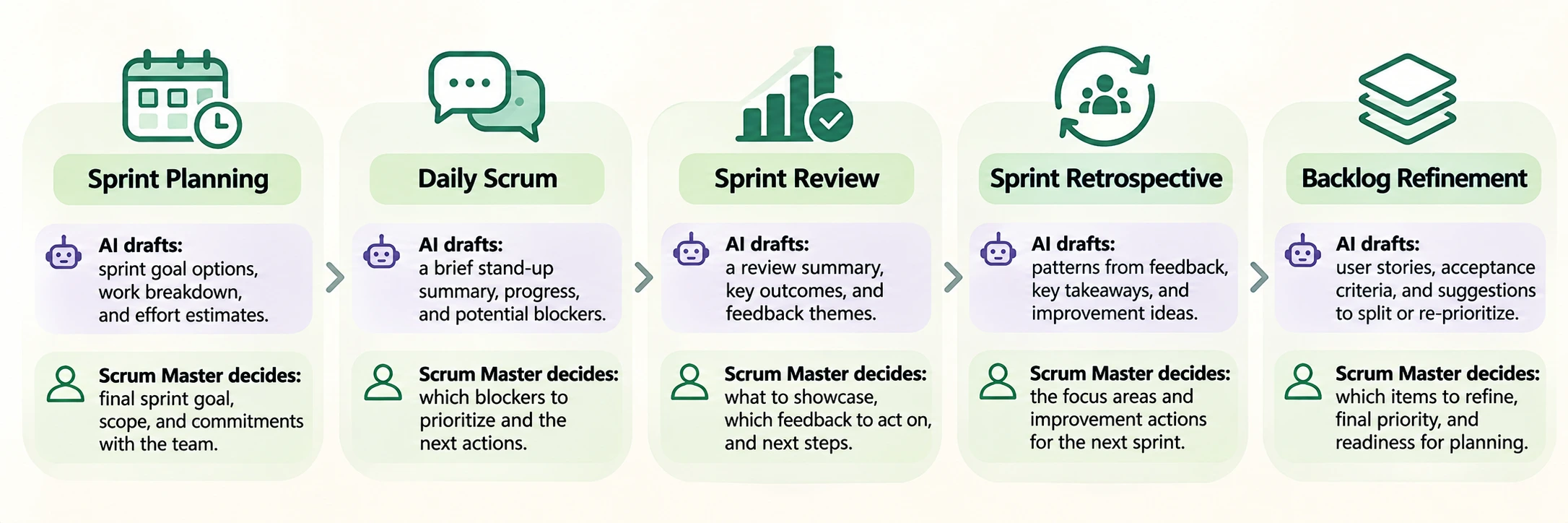
Generative AI for Scrum Masters mostly means less typing and faster first drafts. Rough stand-up notes become a summary, a vague backlog item becomes a story with acceptance criteria, and retro comments become a list of themes. You still read the room, decide what matters and answer for what reaches the team and stakeholders.
This guide shows where AI in Agile project management helps across the sprint, where each main tool fits, three prompts to copy and where the limits are. It is for Scrum Masters, Agile project managers and coordinators who already run the events. Tool features change often, so check what your licence includes first.
Table of Contents
▼Generative AI in Scrum: Practical Uses, Event by Event
These examples are my own assessment of common use, not measured results. Remove names and confidential detail before pasting anything.
Sprint Planning and Backlog Management
Paste your top backlog items and ask the model to flag ones that look too large, unclear or dependent on another team. With 40 open items, AI can group them by theme in a minute. Only the team can say the payments story is really two sprints of work, so use the output as a refinement checklist, not an estimate.
User Stories and Acceptance Criteria
Give the model a stakeholder's plain request and ask for a user story with Given/When/Then acceptance criteria. Drafts are usually sensible but often miss domain rules, such as a refund window or an approval step. Take the draft to the Product Owner and developers to react to.
Daily Stand-Up Summaries
If the team posts updates in a channel, AI can condense them into done, in progress and blocked. Meeting tools can also take notes if transcription is on and the team agrees. Read the summary before sharing it, because a missed "I'm stuck on the test environment" defeats the purpose.
Identifying Blockers and Sprint Risks
Paste the board's status and ask which items look at risk: no movement for three days, several dependencies, or work still in To Do at mid-sprint. The model sees only what you give it, so it finds patterns, not causes. Ask the developer why the ticket stalled.
Sprint Retrospectives
Ask AI to cluster anonymised retro notes into themes and suggest two discussion questions for each. Keep notes about a named person out of the tool, and run the conversation yourself.
Team Communication and Documentation
Use it for first drafts of sprint review notes, release notes, stakeholder emails and working-agreement updates. Match the tone to how your team talks, and check every date and commitment before sending.

AI Tools for Scrum Masters: Where Each One Fits
| Tool | Practical use | Check first |
|---|---|---|
| ChatGPT | Drafting stories, summarising pasted notes, rewording updates | Whether company policy allows pasting work data into it |
| Microsoft Copilot | Summaries and suggested action items from Teams meetings | Recap needs Teams Premium or a Copilot licence, and some features need transcription |
| Atlassian Intelligence (now Rovo in Jira) | Suggesting child work items, turning Slack or Teams chat into work items, summarising comments | Enabled by default on Standard, Premium and Enterprise plans; your admin controls it |
| Gemini | Meeting notes in Meet, email thread summaries, first drafts in Docs | Which Google Workspace plan you have |
Pick the tool your company has approved and connected to where the team already works. For the skills around these tools, MicroDegree's learning platform is one place to look.
Three Generative AI Prompts for Scrum Masters to Try This Sprint
Replace the bracketed parts and strip out names and confidential detail first. Asking the model for its assumptions makes gaps easier to see.
- Backlog check: "I am a Scrum Master preparing backlog refinement. Here are 10 backlog items: [paste]. List the ones that look too large for one sprint, unclear, or dependent on another team, and give one clarifying question for each."
- Story and criteria: "Turn this request into a user story with acceptance criteria in Given/When/Then form: [request]. List the assumptions you made and three questions for the Product Owner."
- Retro themes: "Group these anonymised retrospective comments into themes. For each theme give a one-line summary and two discussion questions. Do not suggest solutions: [comments]"
Benefits and Limits of AI in Agile Project Management
Where It Helps
- Faster first drafts of stories, notes and updates, so admin takes less of the week.
- A consistent format for stories and summaries across teams.
- Quick pattern-spotting across many board items or retro comments.
- More time left for coaching and removing impediments.
Where It Falls Short
- It can state wrong details with confidence, so every output needs a human check.
- It does not know team dynamics, politics or the unspoken reason a ticket is stuck.
- Pasting sprint or customer data into an unapproved tool is a privacy and policy risk.
- Relying on it too much can dull your own read of the team.
What Scrum Masters Earn in India
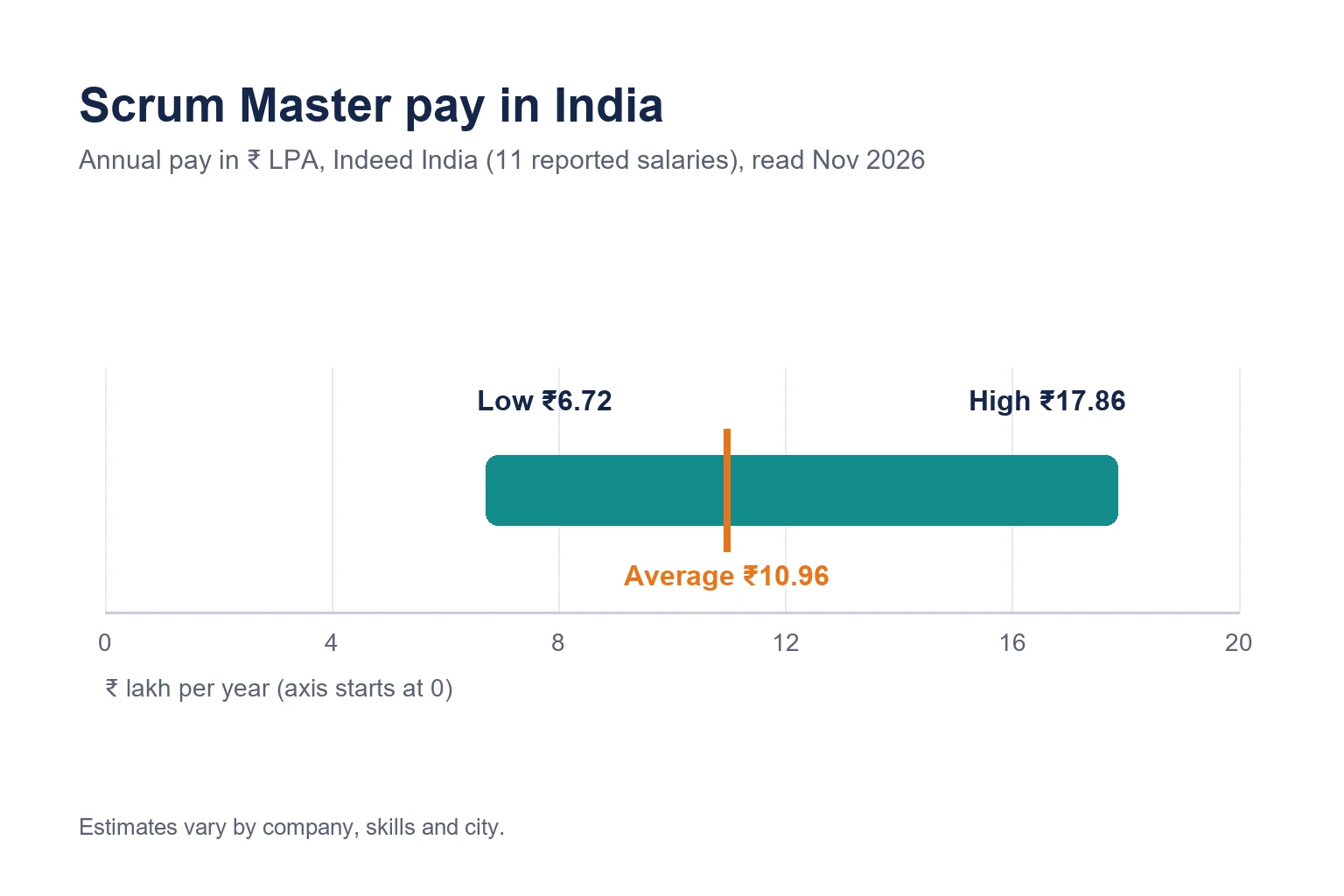
AI skills do not guarantee a raise, but pay is part of any career decision. Indeed India shows the following, read in November 2026 (page updated 26 October 2026). These are estimates and vary by company, skills and city.
| Measure (India-wide) | Indeed India figure |
|---|---|
| Average | ₹10.96 LPA (₹10,95,509 per year) |
| Typical range | ₹6.72 to ₹17.86 LPA |
| Based on | 11 reported salaries |
That is a small sample with no split by experience or city, and I could not read AmbitionBox, Glassdoor or Payscale, so there is no second source to compare it with. Treat it as a rough guide.
Conclusion
- Prompting with context: say your role, the input, the format you want and the limits.
- Critical review: check every output against the board and the team before it goes anywhere.
- Data handling: know what may be pasted into which tool, and anonymise by habit.
- Facilitation and coaching, which no tool does for you.
- Enough cloud and delivery-metrics knowledge to follow the technical conversation. See Cloud Skills Every Scrum Master Should Learn in 2026.
- A simple way to measure whether the tool saves time or only adds checking.
Generative AI for Scrum Masters works best as a drafting assistant with you as the editor. Start with one event, such as backlog refinement or retro themes, and keep it if it saves time without lowering quality. For the wider project-role view, read Generative AI for Program Managers. If you want structured practice, MicroDegree's Generative AI program is one option.
Continue Learning with MicroDegree
Using AI well in your sprints starts with practice and sound judgement. Explore MicroDegree's e-learning platform to look at courses across cloud, DevOps and AI together, and pick the skill that fits the work your team does.
FAQs
1. Can ChatGPT replace a Scrum Master?▼
No. It can draft stories, summaries and emails, but it cannot coach a team, notice tension in a retro or take responsibility for how Scrum is run. It can take over some of the admin.
2. Is it safe to paste sprint data into ChatGPT or Copilot?▼
Only if your company approves the tool for that data. Remove names, customer details and anything confidential first, and ask your IT or security team which tools are allowed.
3. Which AI tool works best with Jira?▼
If your Jira plan includes Rovo, start there, since it works inside your work items. Otherwise export a few items and paste them into an approved assistant such as ChatGPT or Gemini.
4. Can AI write good acceptance criteria?▼
It can write a usable first draft. Check that each criterion is testable, that it reflects your business rules and that nothing contradicts another story. The Product Owner and developers should review it.
5. How do I start using generative AI in Scrum without upsetting the team?▼
Begin with your own admin, such as drafts of notes and stakeholder updates. Tell the team when something was AI-drafted, agree rules on what may be pasted, and add the rules to the working agreement.